PRIMARY CATEGORY → CRACKING
General Workflow
Search for the Utility
Multiple “2John” Tools
locate *john* | grep -i -- '<FILE_TYPE>'Obtain a Hash from the Provided File
<FILE>2john <FILE> > <FILE>.johnCrack the Hash with John
john --wordlist=<WORDLIST> <FILE>.johnShow the obtained Password
john --show <FILE>.johncat ~/.john/john.potZIP
Show .ZIP File Technical Metadata and Other information
7z l -slt <ZIP_FILE>Obtain a Hash/Digest from the Zip File
zip2john <ZIP_FILE> > zip.johnHash Cracking with John
john zip.john --wordlist=/usr/share/wordlists/rockyou.txtShow Cracked Hashes/Passwords
john --show zip.johncat ~/.john/john.potGZIP
Encrypted with OpenSSL
Check whether the file is encrypted or not
file <GZIP_FILE>If encrypted, the output should be similar to the following one →
GZIP.gzip: openssl enc'd data with salted passwordCracking with OpenSSL
while IFS= read -r _passwd ; do openssl enc -aes-256-cbc -d -in <GZIP_FILE> -k "$_passwd" 2> /dev/null | tar xz ; done < <WORDLIST>BitLocker Encrypted Drives
Obtain the First Hash (Bitlocker Password) from the Encrypted Virtual Drive
bitlocker2john -i Private.vhd 2> /dev/null | grep -i -- '\$bitlocker\$0' > bitlocker.hash # .VHD[X] FileImportant
The output of the above command returns four hashes
The first two correspond to the Bitlocker Password
The remaining two are related to the Bitlocker Recovery Key
Since this Recovery key is very long and randomly generated, It is generally not practial to guess
Cracking Bitlocker Hash
- Hashcat
Hashcat Mode → 22100
hashcat --force -O --attack-mode 0 --hash-type 22100 <HASH> <WORDLIST>- John the Ripper
john --wordlist=<WORDLIST> --format=bitlocker <HASH>Mounting Bitlocker-Encrypted Drives in Windows
Mount the .VHD File
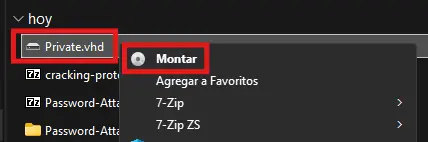
Zoom In
Enter the cracked password at the Bitlocker Password Prompt
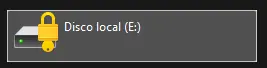
Zoom In
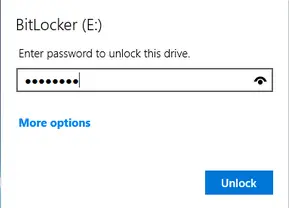
Zoom In
Mounting Bitlocker-Encrypted Drives in Linux
| UTILITY | PURPOSE |
|---|---|
losetup | Convert a file (.VHD, .ISO, .IMG…) into a block device |
dislocker | Decrypt and access an encrypted volume with Bitlocker |
mount | Mount the decrypted file system to access all the archives |
Dislocker Installation
apt install -y -- dislockerLoop Device Creation based on the VHD File using losetup
losetup --find --show --partscan -- <VHD>Check if the created Loop Device is available
losetup --alllsblk -fm | grep -i -- loopFolders Creation to mount the VHD File
mkdir -p -- /media/{bitlocker,bitlockermount}Drive Decryption using Dislocker
dislocker --volume /dev/loop0p1 --user-password -- /media/bitlocker
> Enter the user password: *****
Check the Mounted Device (VHD)
mount | grep -i -- dislockerMount the Decrypted Volume
mount --options loop -- /media/bitlocker/dislocker-file /media/bitlockermountfind /media/bitlockermountAnsible Vaults
Format
$ANSIBLE_VAULT;1.1;AES256
<SNIP>
e.g.
$ANSIBLE_VAULT;1.1;AES256
32666534386435366537653136663731633138616264323230383566333966346662313161326239 613435366366346237326563383235666335639383039640a346431373431666433343434366139 3565363437633366623461346639653433030656165396464323564373334616262613439343033 6334326263326364380a65303431333326639323433626130343834663538326439636232306531 3438
Workflow
Extracting the Vault Blob
Ansible Vault Secrets are usually stored within Ansible Playbooks. So first, we need to extract the given hashes Ansible Vault Hash from the playbook or inventory file
Let’s assume we have this Ansible Playbook
main.yml
---
pwm_run_dir: "{{ lookup('env', 'PWD') }}"

pwm_hostname: authority.htb.corp
pwm_http_port: "{{ http_port }}"
pwm_https_port: "{{ https_port }}"
pwm_https_enable: true

pwm_require_ssl: false

pwm_admin_login: !vault |
          $ANSIBLE_VAULT;1.1;AES256
  	<SNIP>

pwm_admin_password: !vault |
          $ANSIBLE_VAULT;1.1;AES256
  	<SNIP>

ldap_uri: ldap://127.0.0.1/
ldap_base_dn: "DC=authority,DC=htb"
ldap_admin_password: !vault |
          $ANSIBLE_VAULT;1.1;AES256
  	<SNIP>
So, we need to generate a file like the following per existing hash
ansible.vault
$ANSIBLE_VAULT;1.1;AES256
32666534386435366537653136663731633138616264323230383566333966346662313161326239
<SNIP>
Converting to Hashcat Format
Once we have put the hashes in question in separeta files, one per hash, proceed as follows to convert them into crackable hashes
ansible2john <ANSIBLE_VAULT_HASH> > <HASH> # e.g. ansible.hashansible.hash
hash:$ansible$0*0*2fe48d...<SNIP>...456cf4b72ec825fc5b9809d*e0417i...<SNIP>...
Cracking with Hashcat
Hashcat Type → 16900
Lastly, just crack the hashes →
hashcat --force -O --attack-mode 0 --hash-type 16900 --user <HASH> <WORDLIST>Then, display the plain password of any cracked hashes, if there are any 😊
hashcat --force -O --attack-mode 0 --hash-type 16900 --user <HASH> <WORDLIST> --showDecrypting Ansible Vault Content
Once we retrieve the AES-256 symmetric encryption key ( i.e. plain password[s] above ), we can access the actual vault content and decrypt its hashes using the ansible-vault CLI utility
We must pass the file that contains only the Ansible Vault Hash, i.e. →
ansible.vault
$ANSIBLE_VAULT;1.1;AES256
32666534386435366537653136663731633138616264323230383566333966346662313161326239
<SNIP>
Setup
python3 -m venv .venv
. !$/bin/activate && pip3 install ansible-vault
Usage
ansible-vault view <ANSIBLE_VAULT_HASH>