PRIMARY CATEGORY → KERBEROS
Components ⟡

AD ACLs
Shutdown Graph
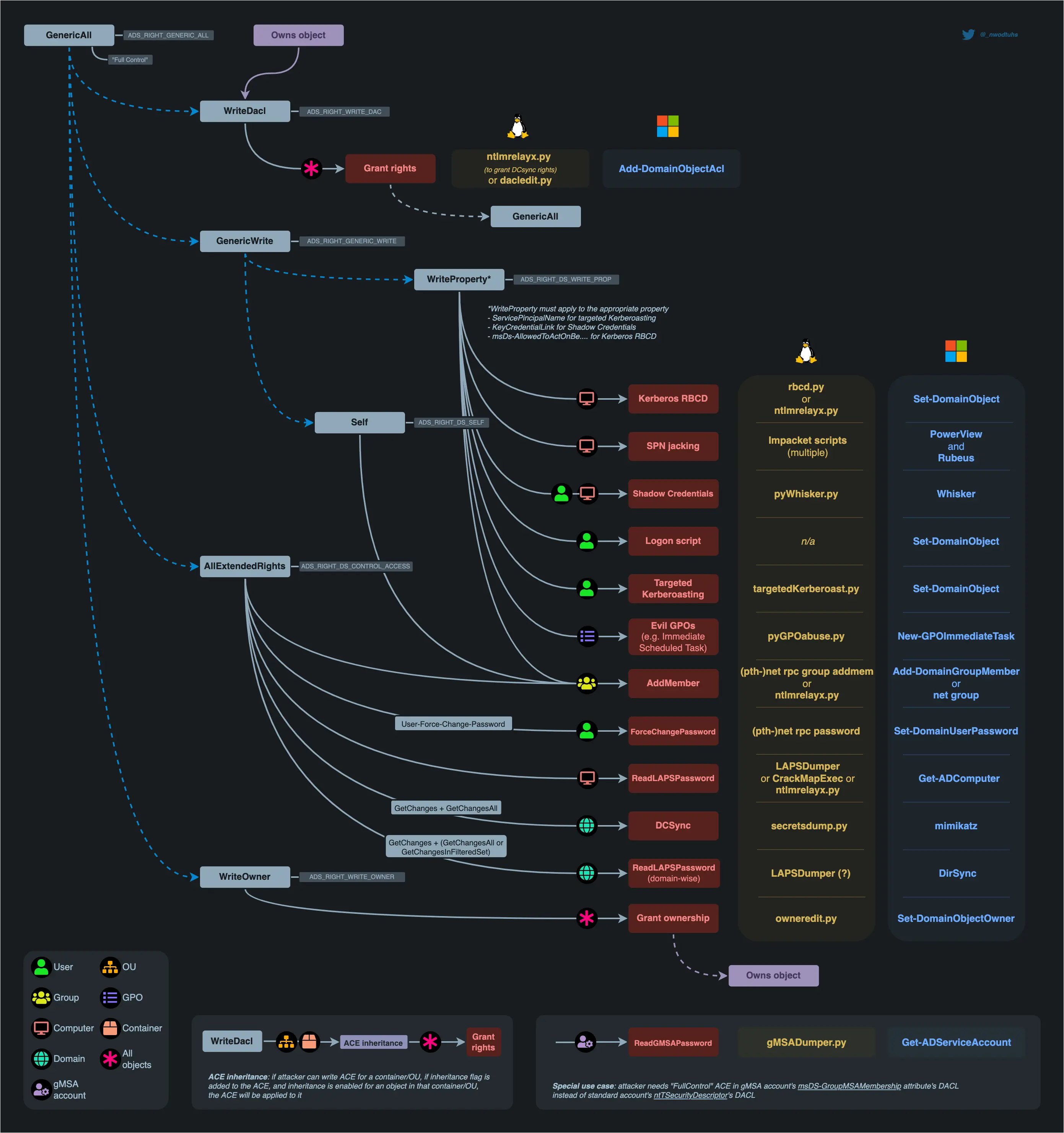
Zoom in
HTB Graph
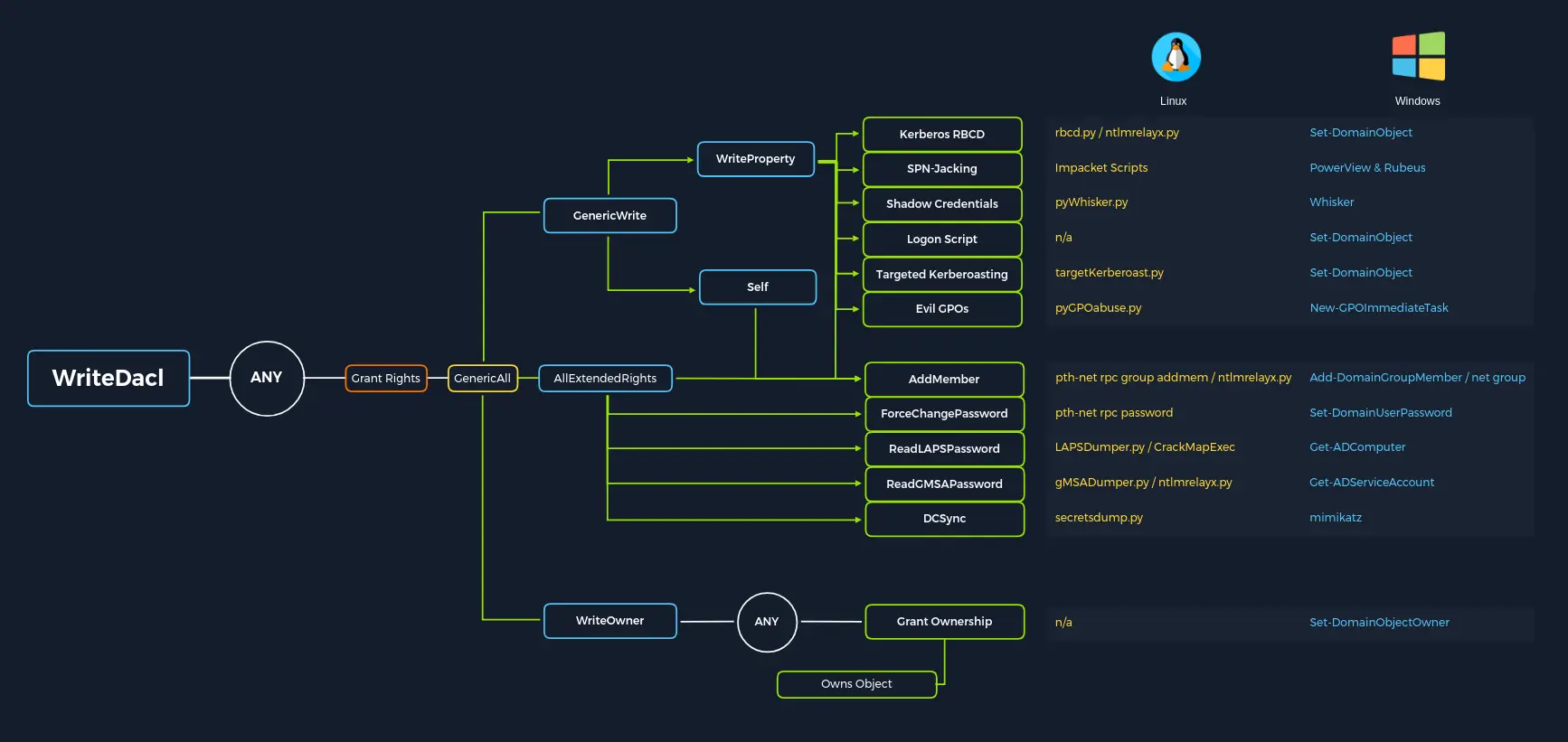
Zoom in
Enumeration - UNIX-like
BloodyAD
Setup
git clone https://github.com/CravateRouge/bloodyAD bloodyAD
cd !$ && python3 -m venv .venv
. !$/bin/activate && pip3 install -r requirements.txt
Read all Domain DACLs
python3 bloodyAD.py --host '<DC>' --username '<USER>' --password '<PASSWD>' --domain '<DOMAIN>' get search --attr 'nTSecurityDescriptor' --resolve-sdWritable Objects by the Controlled Principal
python3 bloodyAD.py --host '<DC>' --username '<USER>' --password '<PASSWD>' --domain '<DOMAIN>' get writable --detail --partition DOMAINImpacket’s DACLedit.py
Read a User Account DACL (All ACEs)
dacledit.py -dc-ip <TARGET> -target '<TARGET>' -action read '<DOMAIN>/<USER>:<PASSWD>'Read a User Account DACL filtering by a certain Object
ACEs can be filtered by samAccountName, distinguisedName or SID
dacledit.py -dc-ip <TARGET> -principal '<PRINCIPAL>' -target '<TARGET>' -action read '<DOMAIN>/<USER>:<PASSWD>'Read all Domain DACLs filtering by a certain Object
Impacket’s Lookupsid.py + Impacket’s DACLedit.py
{ while IFS= read -r _sid; do ( dacledit.py -dc-ip <TARGET> -principal '<USER>' -target-sid "$_sid" -action read '<DOMAIN>/<USER>:<PASSWD>' & ) ; done < <( lookupsid.py '<DOMAIN>/<USER>:<PASSWD>@<TARGET>' | awk -v IGNORECASE=1 '/^[0-9]{1,5}/ { gsub(/:/,"",$1); print "<DOMAIN-SID>"$1 }' ) ; } > <OUTPUT_FILE> ; waitNetexec
nxc ldap '<DC>' --dns-server '<DC_IP>' --username '<USER>' --password '<PASSWD>' -d '<DOMAIN>' --bloodhound --collection 'ACL,ObjectProps'cat '<JSON_RESOURCE>' | jq .BloodHound
See here
Enumeration - Windows
AD Powershell Module
Read all Domain DACLs filtering by a certain Object
- Creating a Domain User Accounts list
Get-ADUser -Filter * | Select-Object -ExpandProperty samAccountName > <USER_LIST>- Getting all Domain ACEs for an specific user account
foreach( $line in [System.IO.File]::ReadLines("<INPUT_FILE>")) {get-acl "AD:\$(Get-ADUser $line)" | Select-Object Path -ExpandProperty Access | Where-Object {$_.IdentityReference -match '<DOMAIN>\<USER>'}}The above command output returns certain values as GUIDs, such as the objectACEType, which means that we will not able to know the given ACE until we convert it to its human-readable format
To do so, we can proceed as follows
$guid = "<GUID>"Get-ADObject -SearchBase "CN=Extended-Rights,$((Get-ADRootDSE).ConfigurationNamingContext)" -Filter {ObjectClass -like 'ControlAccessRight'} -Properties * |Select Name,DisplayName,DistinguishedName,rightsGuid| ?{$_.rightsGuid -eq $guid} | flPowerview
See here
Read all Domain DACLs filtering by a certain Object
Extracting all Domain ACEs that match a certain user account
- Getting the SID of the given user account
$sid = Convert-NameToSid <USER>- Getting all Domain ACEs for an specific user account
Get-DomainObjectACL -ResolveGUIDs -Identity * | ? { $_.SecurityIdentifier -eq $sid }